
Free
$0Free plan available.
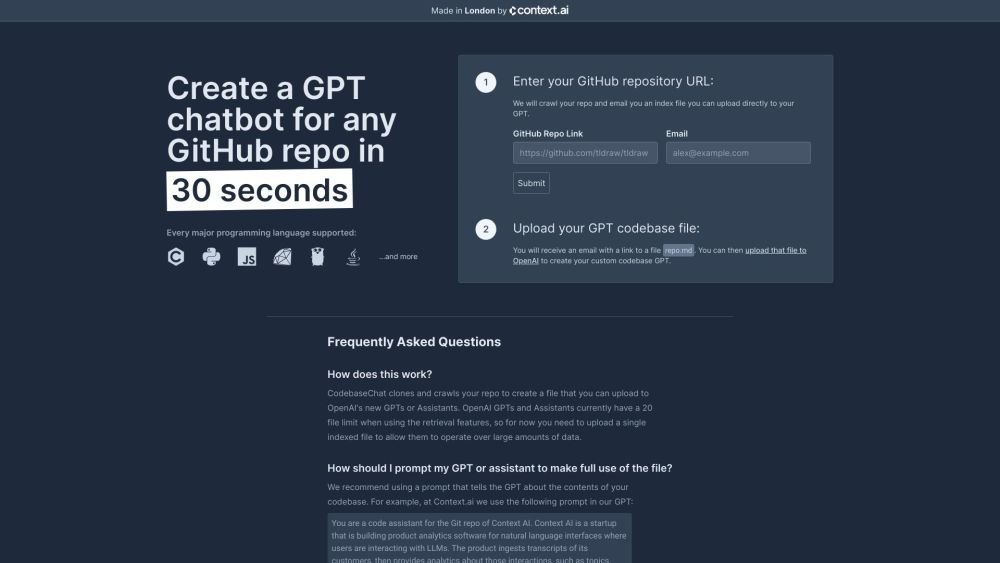
CodebaseChat is a free and open-source tool that allows users to create an OpenAI GPT with knowledge about any GitHub repository. By providing a GitHub repository URL, CodebaseChat crawls the repo and generates an index file that can be uploaded to OpenAI to create a custom codebase GPT.
1. Enter your GitHub repository URL on the CodebaseChat website. 2. Provide your email address to receive the generated index file. 3. Upload the received repo.md file to OpenAI to create your custom codebase GPT.
CodebaseChat clones and crawls your repository to generate a file compatible with OpenAI's GPTs or Assistants. Since OpenAI currently limits retrieval features to 20 files, this tool creates a single indexed file that allows your GPT to process large amounts of data.
We recommend using a prompt that describes your codebase's purpose. For example, at Context.ai, we use: 'You are a code assistant for the Git repo of Context AI. Context AI is a startup that is building product analytics software for natural language interfaces where users are interacting with LLMs. The product ingests transcripts of its customers, then provides analytics about those interactions, such as topics, sentiment analysis, languages spoken and more. The contents of the codebase are stored in repo.md, with the contents of each file under a new Markdown header.'
Yes, CodebaseChat is open-source and we welcome contributions. You can find the repository here.
Yes, you can upload the repository file to the OpenAI Assistants Playground and query your repository using the GPT API free tier.
We do not currently support private repositories. Please contact us if you would like to be notified when this feature is launched.
Free plan available.
Use these comparison pages to understand the trade-offs between the models most relevant to CodebaseChat.
Compare GPT 5.4 and GPT 5.4 Pro across pricing, context window, capabilities, benchmarks, and API access to choose the better fit for long-context workloads versus long-context workloads.
Compare GPT 5.5 and GPT 5.4 across pricing, context window, capabilities, benchmarks, and API access to choose the better fit for long-context workloads versus long-context workloads.
Compare GPT 5.5 and Claude 4.6 Opus across pricing, context window, capabilities, benchmarks, and API access to choose the better fit for long-context workloads versus long-context workloads.
Compare GPT 5.5 and Claude 4.6 Sonnet across pricing, context window, capabilities, benchmarks, and API access to choose the better fit for long-context workloads versus long-context workloads.

Similar AI tool in the AI Assistant category.
Similar AI tool in the AI Assistant category.
Similar AI tool in the AI Assistant category.
Similar AI tool in the AI Productivity Tools category.
Similar AI tool in the AI Assistant category.
Similar AI tool in the AI Assistant category.
Similar AI tool in the AI Chatbot category.
Similar AI tool in the AI Chatbot category.
Similar AI tool in the AI Assistant category.
Similar AI tool in the AI Chatbot category.
Similar AI tool in the AI Assistant category.
Similar AI tool in the AI Assistant category.