
Free
$0Free plan available.
CreativeMagicPanel provides a suite of Photoshop panels and plugins engineered to enhance creative efficiency and accelerate photo editing workflows. Featuring tools such as Magic Touch Panel and Color Match Pro, the platform offers AI-powered functionality and unlimited photo editing capabilities for a one-time fee. These tools are designed to streamline complex retouching processes, enabling users to produce professional-quality results quickly.
Install the panel or plugin into Adobe Photoshop. Once installed, access the various features and tools directly within the Photoshop interface to edit photos using one-click actions, AI-powered adjustments, and custom overlays.
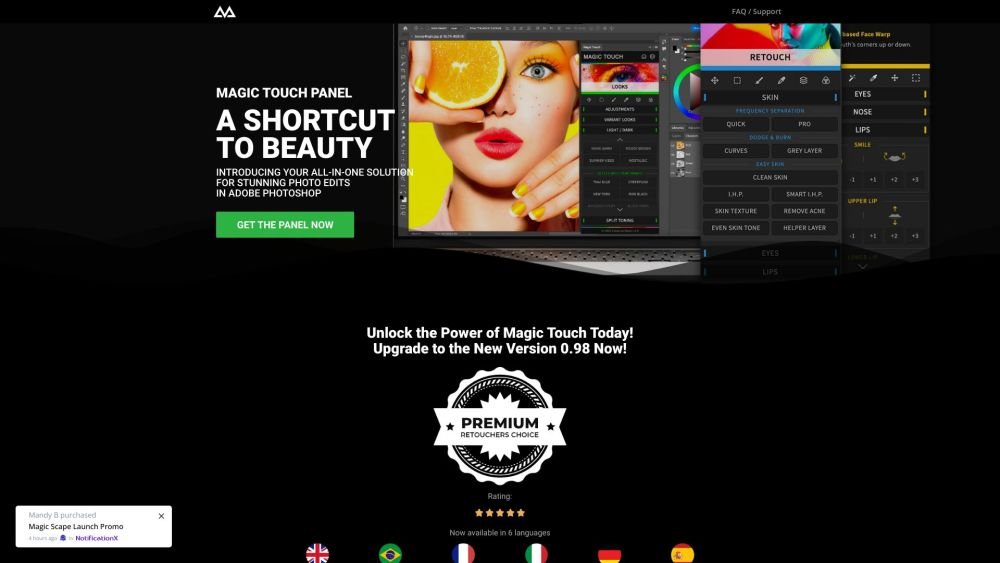
Magic Touch Panel is a Photoshop retouching tool designed to help users perform professional-grade beauty retouching in seconds using AI-driven features.
Key features include AI-based face and body recognition, efficient skin enhancement tools, over 289 distinct features, and a variety of professional looks that can be applied with a single click.
No, Magic Touch provides lifetime access to unlimited photo editing with a one-time payment and no recurring subscription fees.
Magic Touch 2 is a Photoshop plugin optimized for Apple Silicon chips, requiring Adobe Photoshop CC 2023 (version 24.0) or later. Magic Touch Classic functions as a legacy extension compatible with Adobe Photoshop CC 2020 and newer; on Macs with Apple Silicon (M-series) chips, it requires running Photoshop in Rosetta mode.
Free plan available.

Similar AI tool in the AI Image Generator category.
Similar AI tool in the AI Background Remover category.
Similar AI tool in the AI Marketing category.
Similar AI tool in the AI Chatbot category.
Similar AI tool in the AI Image Generator category.
Similar AI tool in the AI Image Generator category.
Similar AI tool in the AI Assistant category.
Similar AI tool in the AI Chatbot category.
Similar AI tool in the AI Image Generator category.
Similar AI tool in the AI Marketing category.
Similar AI tool in the AI Marketing category.
Similar AI tool in the AI Image Generator category.