Docswrite

2
5 0 Reviews 2 Saved
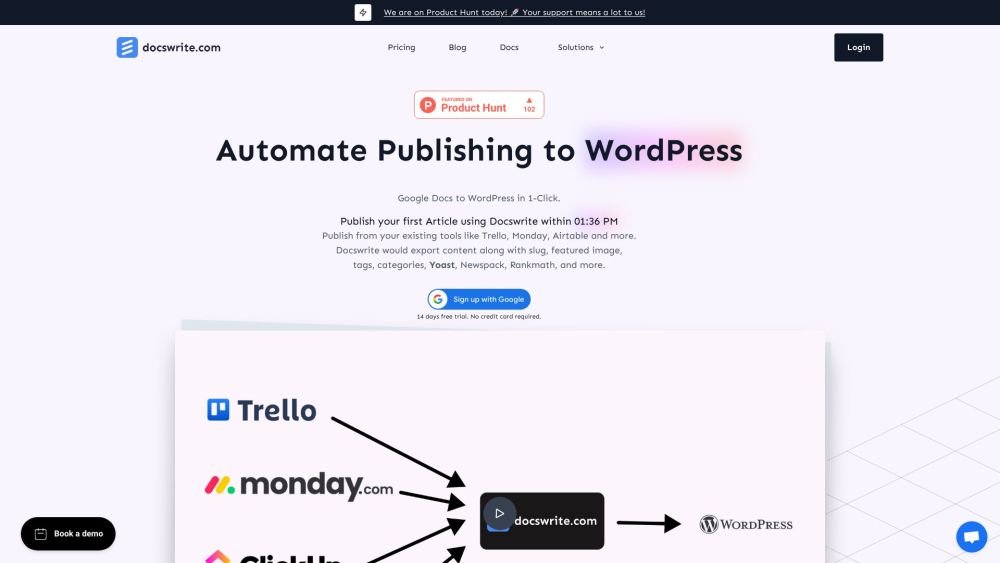
Introduction: Docswrite automates the process of publishing content from Google Docs to WordPress. With a single click, you can export content along with compressed images, slugs, featured images, tags, categories, and metadata for plugins like Yoast, Newspack, and Rankmath. Additionally, you can publish articles from Trello, Monday, Airtable, Google Sheets, or any other source via the Docswrite Zapier integration.
Monthly Visitors: 35.0K
Social & Email: X YouTube

Docswrite Product Information

What is Docswrite?

Docswrite is a productivity tool for publishers designed to automate the transfer of content from Google Docs to WordPress. With one click, you can export your content, including compressed images, slugs, featured images, tags, categories, and settings for Yoast, Newspack, and Rankmath. You can also publish articles from Trello, Monday, Airtable, and Google Sheets, or use the Docswrite Zapier app to publish from any source.

How to use Docswrite?

Write your content in Google Docs, including details such as the title, slug, tags, categories, and featured image. Then, publish your content to WordPress with a few clicks from the Docswrite dashboard or your preferred project management tool.

Docswrite's Core Features

  • One-click export from Google Docs to WordPress
  • Programmatic SEO publishing
  • Integration with project management tools
  • Automatic image compression
  • SEO optimization (Yoast, RankMath, Newspack)
  • Bulk Google Docs import

Docswrite Use Cases

#1 Publish articles from Google Docs to WordPress
#2 Programmatically create WordPress posts from Google Sheets data
#3 Automate content publishing from Trello, Monday, Airtable, and other platforms

FAQ from Docswrite

How do I use Docswrite? +

Docswrite offers two workflows: publishing from your existing tools (e.g., Trello via Zapier) or publishing directly from the Docswrite dashboard. Choose the method that best fits your system. All fields available in the Zapier app can also be defined in a table at the top of your Google Doc.

What about SEO? +

You can configure SEO details directly within your Google Doc, via the Zapier app, or through our API. We support Yoast, Rankmath, and Newspack SEO settings.

What is Docswrite? +

Docswrite is a productivity tool that helps you and your team publish articles from Google Docs to WordPress. You can also publish content from Trello, Monday, Airtable, and Google Sheets, or use our Zapier app to connect any other source.

Do I need to pay for the trial? +

No, we offer a 14-day free trial with no credit card required. You can explore all features to determine if the service meets your needs. Feel free to contact us with any questions.

Can I set a featured image? +

Yes, you can set a featured image. You may choose to have the first image in your Google Doc automatically set as the featured image, or you can specify an image URL.

How do I set tags, categories, slugs, titles, and SEO? +

You can define tags, categories, slugs, titles, and SEO settings (for Yoast and Rankmath) directly in your Google Doc, or via the Zapier app or our API.

Are additional WordPress plugins required? +

No, you do not need any additional plugins unless you wish to configure Yoast or Rankmath SEO details.

Do you support Newspack? +

Yes, you can configure various Newspack settings for an article within your Google Doc or via the Zapier app.

How many articles can I publish on the startup plan? +

The startup plan allows you to publish 75 articles, which is sufficient for most blogs. If you require more, you can upgrade to a higher plan. All published articles are formatted and SEO-optimized.

How many programmatic posts can I publish on the startup plan? +

You can publish 1,000 programmatic posts on the startup plan, with each row of data from your Google Sheet published as a separate post.

What happens to my articles if I cancel my subscription? +

Your articles will remain published; canceling your subscription does not affect existing content. Docswrite functions as your virtual assistant.

What happens to the images in my articles? +

Images found in your Google Docs are uploaded to your WordPress Media Library. You have the option to automatically set the first image in the document as the featured image.

Can I use Docswrite with my existing WordPress site? +

Yes, you can use Docswrite with your existing WordPress site or your client’s site. Please contact us if you have any questions.

Can Docswrite compress images? +

Yes, Docswrite can compress images. You can choose to enable image compression when publishing an article.

Docswrite Pricing

Free

$0

Free plan available.

Related Model Comparison Pages

Use these comparison pages to understand the trade-offs between the models most relevant to Docswrite.

You Might Also Like

Yapping - Chrome Extension

Yapping - Chrome Extension

AI Chatbot

Yapping is a Chrome extension that enables voice-based interaction with ChatGPT, removing the need for manual typing. It provides access to premium features at a lower cost by allowing users to integrate their own OpenAI API key.

Contact N/A Views
Details
FinverAI - Chrome Extension

FinverAI - Chrome Extension

AI Productivity Tools

FinverAI is an AI-powered financial analysis Chrome extension that provides users with insights and tools to support informed investment decisions. By utilizing advanced algorithms and machine learning, it analyzes market trends, forecasts stock performance, and delivers personalized investment recommendations.

Contact N/A Views
Details
IsItAI.com - Chrome Extension

IsItAI.com - Chrome Extension

AI API

The IsItAI.com Chrome extension leverages artificial intelligence to detect and classify images. By analyzing uploaded files, it determines whether an image is a real photograph or AI-generated, providing a confidence score and content classification for each result.

Contact N/A Views
Details
AI Chat Assistant Browser Extension - Chrome Extension

AI Chat Assistant Browser Extension - Chrome Extension

AI Assistant

The AI Chat Assistant Browser Extension is a tool designed to improve the convenience and efficiency of your AI chat interactions. It offers support for content creators, researchers, customer service representatives, and other professionals who rely on AI chat tools, helping to streamline their daily workflows.

Contact N/A Views
Details
Virtual Try-On - Chrome Extension

Virtual Try-On - Chrome Extension

AI Assistant

The Virtual Try-On Chrome extension enables users to upload clothing images from any website to instantly visualize how garments appear on their own body. This tool provides a virtual try-on experience that helps customers preview the fit and look of clothing before completing a purchase.

Contact N/A Views
Details
ViiTor - Chrome Extension

ViiTor - Chrome Extension

Large Language Models (LLMs)

ViiTor is a Chrome extension that provides real-time audio transcription and translation for live broadcasts, online videos, and virtual meetings, allowing users to display bilingual subtitles.

Contact N/A Views
Details
AI-powered real-time call assistant - Chrome Extension

AI-powered real-time call assistant - Chrome Extension

AI Assistant

This AI-powered Chrome extension acts as a real-time call assistant for Google Meet, Zoom, and MS Teams. It offers live transcription, meeting summarization, and action item extraction to help you stay productive. Additionally, it provides real-time feedback on your speaking style and clarity to improve communication effectiveness.

Contact N/A Views
Details
VSX Extension - Chrome Extension

VSX Extension - Chrome Extension

AI Chatbot

The VSX Extension is a Chrome extension designed to improve your learning process through integrated quiz generation and chatbot capabilities. This tool offers interactive quizzes and conversational support to assist with your educational needs.

Contact N/A Views
Details
We360.ai Extension - Chrome Extension

We360.ai Extension - Chrome Extension

AI Assistant

The We360.ai Chrome extension offers insights into remote and hybrid workforce productivity, including website usage analysis, screenshot capabilities, and team performance monitoring.

Contact N/A Views
Details
Zalo Automation Tool - Chrome Extension

Zalo Automation Tool - Chrome Extension

AI Chatbot

The Zalo Automation Tool is a Chrome extension designed to streamline tasks on Zalo, the popular messaging and social networking platform. It automates sending messages, adding friends, building communities, and identifying potential customers, helping businesses and individuals efficiently manage their Zalo presence and expand their reach.

Contact N/A Views
Details
ChartIQ AI - Chrome Extension

ChartIQ AI - Chrome Extension

AI Chatbot

ChartIQ AI is a Chrome extension that enhances the trading experience using AI-driven insights. It utilizes artificial intelligence to deliver advanced analytics, predictive modeling, and personalized recommendations, helping traders refine their decision-making and improve overall trading results.

Contact N/A Views
Details
Scriba AI - Chrome Extension

Scriba AI - Chrome Extension

AI Productivity Tools

Scriba AI is a Chrome extension designed to help you compose and reply to emails quickly and accurately.

Contact N/A Views
Details
