
Free
$0Free plan available.
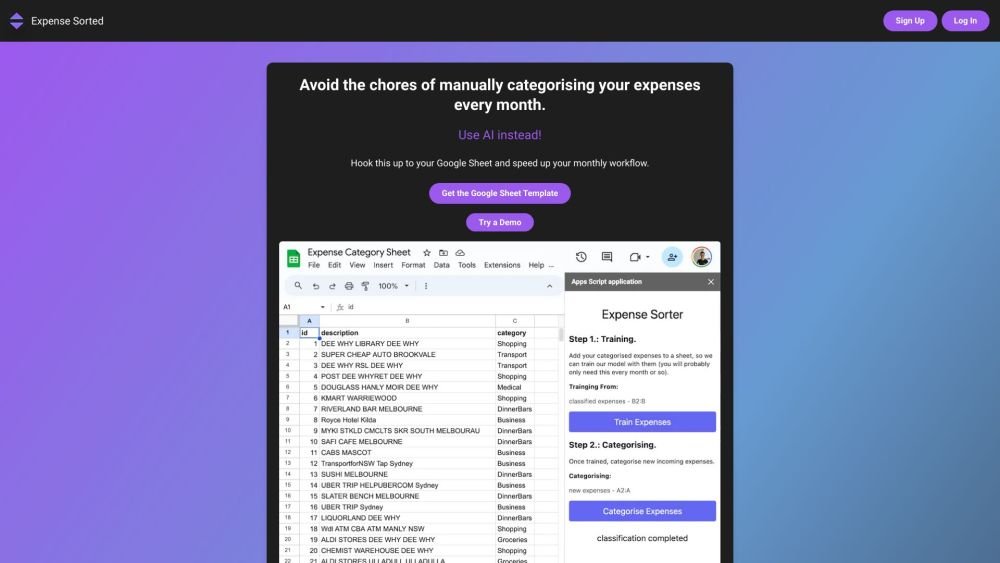
Expense Sorted is an AI-powered tool designed to automatically categorize monthly expenses. It integrates with Google Sheets, Lunch Money, Tiller, and soon PocketSmith, allowing users to streamline their budgeting process. The tool eliminates the need for manual categorization by using AI to analyze transactions and assign them to appropriate categories. It also offers a free Google Sheet template to help users get started quickly.
1. Import your transactions into Google Sheets. 2. Use the Expense Sorted add-on to automatically categorize your transactions with AI. 3. Review and analyze the categorized data directly within your sheet.
Expense Sorted uses AI to automatically categorize transactions by analyzing merchant names and transaction details.
Yes, Expense Sorted prioritizes user privacy, ensuring your transactions remain within your Google Sheet.
Yes, you can tailor the categories to align with your specific spending habits.
Free plan available.
Use these comparison pages to understand the trade-offs between the models most relevant to Expense Sorted.
Compare Gemini 1.0 Pro Deprecated and Gemini 1.5 Flash Vision Deprecated across pricing, context window, capabilities, benchmarks, and API access to choose the better fit for long-context workloads versus general-purpose AI workloads.
Compare Gemini 1.5 Pro Vision Deprecated and Gemini 1.0 Pro Deprecated across pricing, context window, capabilities, benchmarks, and API access to choose the better fit for general-purpose AI workloads versus long-context workloads.
Compare Gemini 1.0 Pro Vision Deprecated and Gemini 1.5 Flash Vision Deprecated across pricing, context window, capabilities, benchmarks, and API access to choose the better fit for general-purpose AI workloads versus general-purpose AI workloads.
Compare Gemini 1.5 Pro Vision Deprecated and Gemini 1.0 Pro Vision Deprecated across pricing, context window, capabilities, benchmarks, and API access to choose the better fit for general-purpose AI workloads versus general-purpose AI workloads.

Similar AI tool in the AI Assistant category.
Similar AI tool in the AI Assistant category.
Similar AI tool in the AI Productivity Tools category.
Similar AI tool in the AI Writing Assistants category.
Similar AI tool in the AI Assistant category.
Similar AI tool in the AI Writing Assistants category.
Similar AI tool in the AI Writing Assistants category.
Similar AI tool in the AI Assistant category.
Similar AI tool in the AI Assistant category.
Similar AI tool in the AI Chatbot category.
Similar AI tool in the AI Productivity Tools category.
Similar AI tool in the AI Assistant category.