40
5 0 Reviews 40 Saved
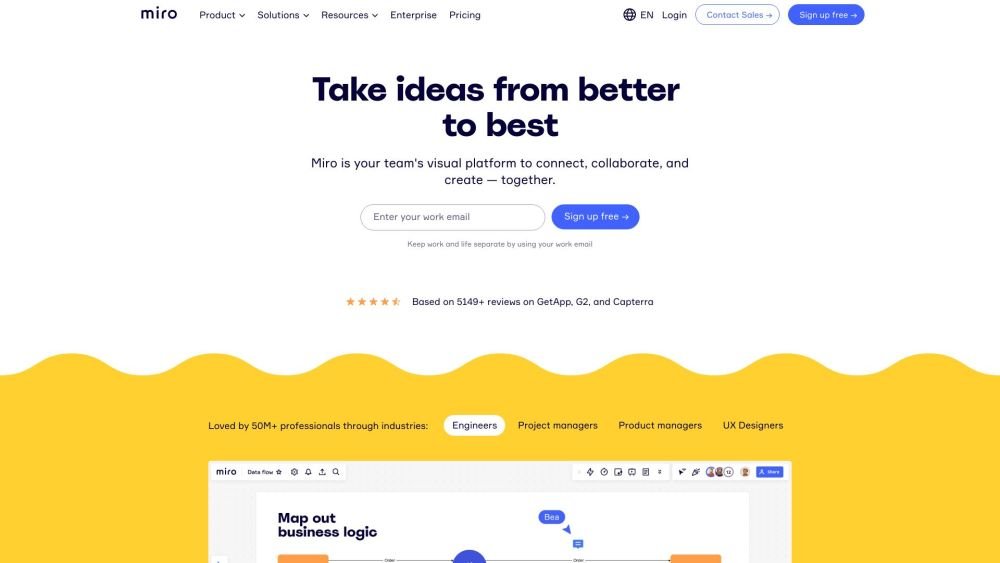
Introduction: Miro is an online collaborative whiteboard platform built for distributed teams to work together efficiently. It supports a wide range of activities, from brainstorming with digital sticky notes to planning and managing agile workflows. Miro provides a limitless canvas that enables teams to manage projects, design products, and collaborate effectively.
Monthly Visitors: 34.4M

Miro Product Information

What is Miro?

Miro is an online collaborative whiteboard platform designed for distributed teams to work together effectively. It supports various activities, from brainstorming with digital sticky notes to planning and managing agile workflows. Miro allows teams to manage projects, design products, and build the future together, offering a limitless canvas for collaboration.

How to use Miro?

Users can sign up for a free account or select a paid plan to access additional features. Once logged in, you can create boards, invite team members, and utilize tools such as sticky notes, templates, and integrations to collaborate on projects, design products, or plan workflows.

Miro's Core Features

  • Online whiteboard
  • Apps & Integrations
  • Templates
  • Miroverse (community templates)
  • Miro AI

Miro Use Cases

#1 Brainstorming and ideation
#2 Agile practices
#3 Diagramming
#4 Research & Design
#5 Strategy & Planning
#6 Meetings and Workshops

FAQ from Miro

How do I get started? +

Upon signing up, you are placed on the Free plan by default. This plan is designed for teams beginning with visual collaboration; you can invite unlimited team members and create unlimited boards, though only 3 boards remain active and editable at once. For advanced functionality, consider our Starter, Business, or Enterprise plans.

What is included with the Free plan? +

The Free plan allows you to experience visual collaboration with unlimited team members, 3 active boards, access to all pre-built templates, and a variety of integrations, including Google Drive and Slack.

Can I change the team size? +

Yes, you can adjust your team size at any time during your subscription. You will be charged a prorated fee for adding new users and receive a credit on your next payment for removing users.

How can I increase Miro AI credits? +

Miro AI credits are determined by the number of licenses in your organization and your specific plan (Starter, Business, or Enterprise). You may purchase an add-on for unlimited credits. Credit limits cannot be increased on the Free plan. Please visit our help center for further details.

Does everyone need a Miro account to collaborate? +

No, if you are using a Starter or Business plan, you can invite anonymous visitors to access your public boards. Learn more on our website.

Does Miro integrate with my existing workflow? +

We offer a comprehensive list of integrations via our Marketplace. If you do not see a specific tool for your workflow or have a suggestion, please let us know.

Is my data secure? +

We prioritize data privacy and security, maintaining industry-leading security practices. You can learn more about our security measures on our website, review our assessment on the Cloud Security Alliance website, or contact us directly with any questions.

We need additional help on documentation (like an MSA or security questionnaire). Who can I reach out to? +

We are happy to assist with your company’s security questionnaire or MSA. Please contact our sales team at miro.com/contact/sales for specific inquiries.

My team is a nonprofit organization. Is special pricing available for NPOs or charitable organizations? +

If you are part of a nonprofit organization, we offer discounted pricing. Please review our website to learn more about the eligibility requirements.

What forms of payment do you accept? +

We accept all major credit cards. For Starter plans with 10+ members or Business plans, you may pay via self-serve invoice. For Enterprise plans, please contact us to receive an invoice payable via bank transfer.

I am a staff member or student of an educational institution. +

To apply for a free Education account, please complete the application form available on our website. Learn more.

Miro Pricing

Free

$0

Free plan available.

Related Model Comparison Pages

Use these comparison pages to understand the trade-offs between the models most relevant to Miro.

Compare Gemini 1.0 Pro Deprecated and Gemini 2.5 Flash across pricing, context window, capabilities, benchmarks, and API access to choose the better fit for long-context workloads versus long-context workloads.

Compare Gemini 2.5 Flash and Gemini 2.0 Flash across pricing, context window, capabilities, benchmarks, and API access to choose the better fit for long-context workloads versus long-context workloads.

Compare Gemini 2.0 Flash Lite and Gemini 2.5 Flash across pricing, context window, capabilities, benchmarks, and API access to choose the better fit for long-context workloads versus long-context workloads.

Compare Gemini 1.0 Pro Deprecated and Gemini 1.5 Flash Deprecated across pricing, context window, capabilities, benchmarks, and API access to choose the better fit for long-context workloads versus general-purpose AI workloads.

You Might Also Like

FinverAI - Chrome Extension

FinverAI - Chrome Extension

AI Productivity Tools

FinverAI is an AI-powered financial analysis Chrome extension that provides users with insights and tools to support informed investment decisions. By utilizing advanced algorithms and machine learning, it analyzes market trends, forecasts stock performance, and delivers personalized investment recommendations.

Contact N/A Views
Details
ReplyPulse.com - Chrome Extension

ReplyPulse.com - Chrome Extension

AI Marketing

ReplyPulse.com is an AI-powered Chrome extension designed to help you scale your presence on X (Twitter) and LinkedIn by generating AI-driven replies. It streamlines social media interactions to help you improve engagement.

Contact N/A Views
Details
We360.ai Extension - Chrome Extension

We360.ai Extension - Chrome Extension

AI Assistant

The We360.ai Chrome extension offers insights into remote and hybrid workforce productivity, including website usage analysis, screenshot capabilities, and team performance monitoring.

Contact N/A Views
Details
Zalo Automation Tool - Chrome Extension

Zalo Automation Tool - Chrome Extension

AI Chatbot

The Zalo Automation Tool is a Chrome extension designed to streamline tasks on Zalo, the popular messaging and social networking platform. It automates sending messages, adding friends, building communities, and identifying potential customers, helping businesses and individuals efficiently manage their Zalo presence and expand their reach.

Contact N/A Views
Details
Plataforma de gestão e inteligência em softwares SaaS com inteligência artificial - Chrome Extension

Plataforma de gestão e inteligência em softwares SaaS com inteligência artificial - Chrome Extension

AI Assistant

This AI-powered Chrome extension serves as a management and intelligence platform for SaaS software. It enables businesses to effectively monitor, analyze, and optimize their SaaS application usage and expenditures.

Contact N/A Views
Details
Kokoro Insights - Chrome Extension

Kokoro Insights - Chrome Extension

AI Assistant

Kokoro Insights is a Chrome extension designed to help you identify ideal candidates with ease.

Contact N/A Views
Details
Lunroo

Lunroo

AI Image Generator

Lunroo is a collection of AI-driven tools built to assist social media marketing teams in increasing productivity, improving audience engagement, and driving traffic. The platform provides specialized tools for LinkedIn, TikTok, YouTube, Instagram, and Twitter, alongside utilities for PDF and image processing, all aimed at streamlining social media management and content creation.

Contact -- Views
Details
AFAnotes

AFAnotes

AI Assistant

AFAnotes for Slack uses AI to help engineering teams streamline updates and save time on manual catch-up tasks. By silencing disruptive Slack notifications and channels, it helps teams reclaim over 100 focus hours. The tool allows you to minimize digital distractions, manage notifications from social apps, and receive essential updates only when needed to maintain a healthier digital balance.

Contact -- Views
Details
WindyFlo

WindyFlo

Large Language Models (LLMs)

WindyFlo is a no-code AI pipeline engineering platform that enables users to build AI features for websites and applications without writing code. Featuring a drag-and-drop interface, it allows for the customization and rapid deployment of AI models. WindyFlo streamlines AI development for both enthusiasts and beginners by offering pre-built pipelines and the flexibility to create custom workflows without complex configurations.

Contact -- Views
Details
Dream Machine AI

Dream Machine AI

AI Productivity Tools

Dream Machine AI is a high-performance model designed to generate realistic, high-quality videos from text and image prompts. Built on Luma AI technology, this scalable transformer model is trained directly on video data to produce consistent, physically accurate, and dynamic shots. It is a powerful, accessible tool for creators looking to streamline video production.

Contact -- Views
Details
PromptPanda

PromptPanda

AI Productivity Tools

PromptPanda is an AI-powered prompt management system built to streamline and improve how you use AI prompts. It provides a centralized platform and browser extension for creating, organizing, sharing, and optimizing prompts, helping teams maintain consistent output quality and improve overall efficiency.

Contact 8.9K Views
Details
Skim AI

Skim AI

AI Assistant

Skim AI is an AI-powered platform built to help businesses secure public tender contracts. It provides daily access to thousands of European tenders, featuring personalized alerts, automated summaries, and centralized tracking. By leveraging past RFP applications, Skim AI automates the proposal process, reducing preparation time from days to minutes and streamlining the entire workflow from initial search to final submission.

Contact -- Views
Details