
Free
$0Free plan available.
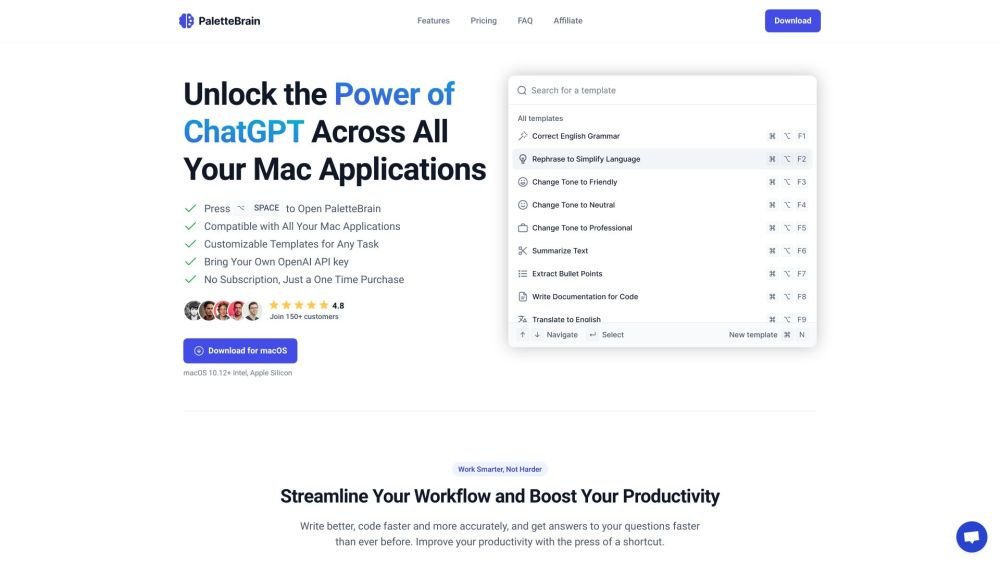
PaletteBrain is a macOS application that integrates ChatGPT with any application using a shortcut. It allows users to create custom templates with their own shortcuts or use the default templates provided. It boosts productivity by enabling custom AI commands and seamless integration without recurring fees. PaletteBrain allows users to access the power of ChatGPT across all macOS apps with a shortcut, eliminating the need to switch between windows and copy-paste texts.
Select text in any application, press ⌥SPACE to launch the AI command palette, execute a command to process the highlighted text, and press ⌘⇧↵ to insert the AI-generated response directly into your original application.
PaletteBrain lets you select text in any app, trigger the AI command palette with a shortcut, run a command to process your text, and paste the resulting response back into your document.
To use PaletteBrain, you need a macOS device and your own OpenAI API key.
No, PaletteBrain requires a personal OpenAI API key. However, this is typically more cost-effective than a ChatGPT Plus subscription, with most users spending less than $2 per month on API usage.
Yes, PaletteBrain maintains privacy between your computer and OpenAI or Azure. You retain control over your conversations, which are stored locally and can be permanently deleted at any time.
Free plan available.
Use these comparison pages to understand the trade-offs between the models most relevant to PaletteBrain.
Compare GPT 5.4 and GPT 5.4 Pro across pricing, context window, capabilities, benchmarks, and API access to choose the better fit for long-context workloads versus long-context workloads.
Compare GPT 5.5 and GPT 5.4 across pricing, context window, capabilities, benchmarks, and API access to choose the better fit for long-context workloads versus long-context workloads.

Similar AI tool in the AI Assistant category.
Similar AI tool in the AI Assistant category.
Similar AI tool in the AI Productivity Tools category.
Similar AI tool in the AI Writing Assistants category.
Similar AI tool in the AI Assistant category.
Similar AI tool in the AI Writing Assistants category.
Similar AI tool in the AI Writing Assistants category.
Similar AI tool in the AI Assistant category.
Similar AI tool in the AI Assistant category.
Similar AI tool in the AI Chatbot category.
Similar AI tool in the AI Productivity Tools category.
Similar AI tool in the AI Assistant category.