
Free
$0Free plan available.
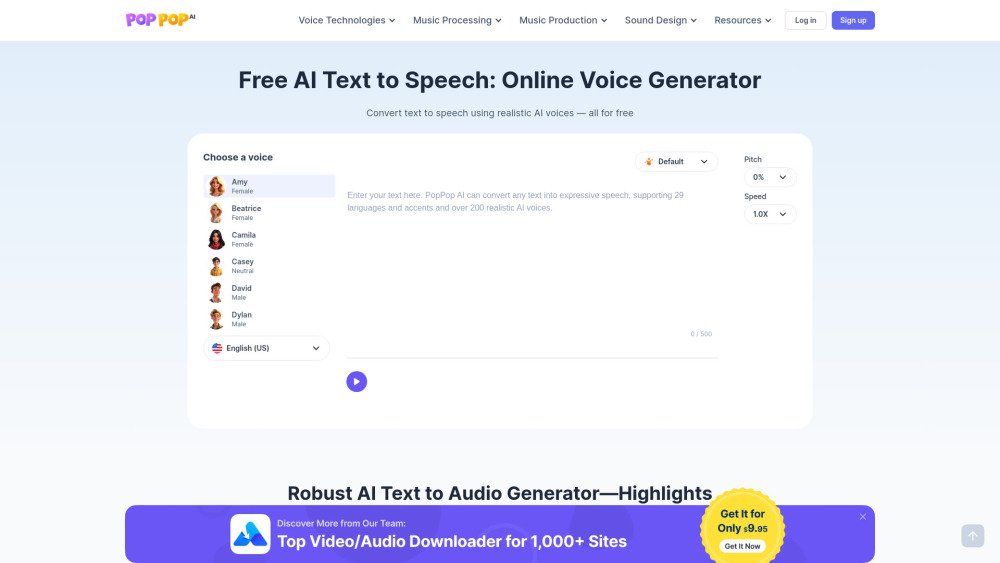
PopPop AI Text to Speech is a free, web-based AI voice generation tool that provides access to over 200 voices in more than 20 languages. It produces fast, natural-sounding speech without the need for signups or exposure to ads, enabling users to convert text to audio while adjusting voice pitch and speed.
To use PopPop AI Text to Speech, enter your text, select your preferred voice and language, customize the speed and pitch settings, and click the Play button to generate the audio. You can then download the resulting audio as an MP3 file.
A text-to-speech (TTS) generator is a tool that converts written text into spoken audio, allowing users to listen to content. This technology uses AI and advanced algorithms to simulate human speech patterns for natural-sounding results.
Yes, this AI Text to Voice Generator is entirely free. It is a web-based tool, so no software installation is required; you can access it directly through your browser to begin converting text to speech.
Yes, the TTS tool is compatible with Windows, macOS, Android, and iOS. You can use it to convert text to audio on both desktop computers and mobile devices.
Yes, you can download your generated audio files directly to your device. The files are saved in MP3 format.
Our AI TTS maker supports a wide range of languages and accents, including American, British, Australian, Canadian, Irish, and Indian English, as well as French, German, Hindi, Italian, Simplified and Traditional Chinese, Cantonese, Japanese, Korean, Polish, Portuguese (Brazil and Portugal), Russian, Spanish, Thai, Turkish, Arabic, Bangla (Bangladesh), Bengali (India), Tamil, Ukrainian, Urdu, and Persian.
Yes, you may use the generated audio for commercial purposes, provided that you comply with our terms of use.
Free plan available.
Use these comparison pages to understand the trade-offs between the models most relevant to PopPop AI Text to Speech.
Compare Gemini 1.0 Pro Deprecated and Gemini 2.0 Flash across pricing, context window, capabilities, benchmarks, and API access to choose the better fit for long-context workloads versus long-context workloads.
Compare Gemini 1.0 Pro Deprecated and Gemini 2.5 Flash across pricing, context window, capabilities, benchmarks, and API access to choose the better fit for long-context workloads versus long-context workloads.
Compare Gemini 2.0 Flash Lite and Gemini 2.0 Flash across pricing, context window, capabilities, benchmarks, and API access to choose the better fit for long-context workloads versus long-context workloads.
Compare Gemini 2.5 Flash and Gemini 2.0 Flash across pricing, context window, capabilities, benchmarks, and API access to choose the better fit for long-context workloads versus long-context workloads.