RewriteBar

0
5 0 Reviews 0 Saved
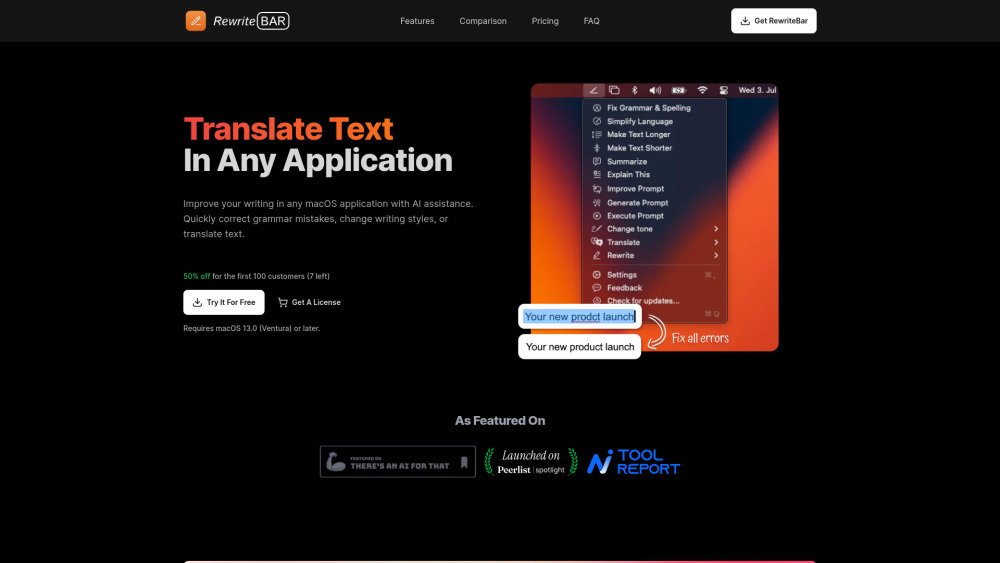
Introduction: RewriteBar is a macOS menu bar AI assistant designed to enhance your writing across any application. It helps you refine sentences in tools like Slack, email clients, and code editors, and integrates seamlessly with existing writing aids like Grammarly. The tool allows you to correct grammar, adjust writing styles, and translate text. Users can create custom rewrite actions, build email templates, draft social media content, or define a personal writing style. With support for over 350 AI models, it offers flexibility in choosing your preferred AI provider.
Monthly Visitors: 5.4K
Social & Email: X YouTube

RewriteBar Product Information

What is RewriteBar?

RewriteBar is a macOS menu bar AI assistant that enhances writing in any application. It improves sentences effortlessly in Slack, emails, or code editors, and works well with tools like Grammarly for better writing. It can quickly correct grammar mistakes, change writing styles, or translate text. Users can design their own rewrite actions to match their needs, create templates for emails, craft engaging social media posts, or develop their personal writing style. It supports multiple AI providers, allowing users to choose from 350+ models.

How to use RewriteBar?

Select text in any macOS application, trigger an action using the command menu or a custom keyboard shortcut, and your writing will be transformed instantly. The corrected text is automatically pasted back, replacing your original selection.

RewriteBar's Core Features

  • Grammar and spelling correction
  • Writing style adjustment
  • Text translation
  • Custom rewrite actions
  • Text summarization and expansion
  • ChatGPT prompt enhancement
  • Multiple AI provider support

RewriteBar Use Cases

#1 Improve Markdown blog posts
#2 Enhance code editor writing
#3 Translate code blocks
#4 Improve writing during daily work
#5 Craft emails
#6 Create content
#7 Improve ChatGPT prompts

FAQ from RewriteBar

How Does It Work? +

RewriteBar captures your selected text via the macOS clipboard and sends it to a language model for processing. The corrected version is then automatically pasted back, replacing the original text.

Is RewriteBar Safe? +

Yes. RewriteBar does not store or track your data. Processing depends on your chosen provider: With the default RewriteBar service, your text is sent to a server to be processed by a language model and returned; your text and API keys are not stored. With third-party providers like OpenAI, Mistral, or Ollama, your request is sent directly from your device to their API, meaning RewriteBar does not see or process your text. The app is a lightweight, 6 MB native macOS tool focused on privacy.

Can RewriteBar Be Used in Any App and Webpage? +

Yes, RewriteBar functions with almost any application or website that supports text input, including Google Chrome, Google Docs, Microsoft Word, Slack, WhatsApp, email clients, Microsoft Teams, Notion, and Visual Studio Code.

Is There a Free Trial? +

Yes, you can try RewriteBar for free with up to 100 corrections. Afterward, you may choose to upgrade to a subscription or a one-time license.

Can I Get a Refund? +

Yes, you can request a refund within 7 days of your purchase by contacting us via email.

Which Languages Are Supported? +

RewriteBar has been tested with English and German, but it should support any language compatible with ChatGPT. Please contact us if you experience issues with a specific language.

What Happens After I Purchase? +

Upon purchase, you will receive an email containing a download link for the app and a license key for activation. This license key also provides access to unlimited app updates.

Are There Any Additional Costs? +

There are no additional costs with the subscription plan. If you use the one-time license, you must provide your own OpenAI API key, which may incur usage-based charges. Most users find that approximately $1 per month is sufficient to get started.

How Do I Cancel My Subscription? +

You can cancel your subscription through the Subscription Portal. If you have questions, please contact us via email.

Do I Need a ChatGPT Plus Subscription for RewriteBar? +

No, a ChatGPT Plus subscription is not required. The OpenAI API uses a pay-as-you-go model, or you can use the RewriteBar AI Cloud included with your subscription plan.

Why Does the App Need Accessibility Permissions? +

The app requires macOS accessibility permissions to retrieve your selected text and replace it with the corrected version, allowing it to work across any application. No data is stored.

How Do I Get an API Key? +

You can create an account on OpenAI to generate an API key. Setup instructions are available in our help center.

What Is the Difference Between the Subscription and the One-Time License? +

The one-time license requires you to provide your own provider API key (such as OpenAI) and may incur usage-based costs. The subscription plan includes access to the RewriteBar AI Cloud, which is ideal for users who prefer not to manage their own API keys.

Is There a Windows Version? +

No, there is no Windows version. RewriteBar is built with native macOS tools and is not compatible with Windows. If you are on Windows, you may consider the alternative: Grammarsen.

I Have Another Question +

You can reach out via email at any time, and I will be happy to help.

RewriteBar Pricing

Free

$0

Free plan available.

Related Model Comparison Pages

Use these comparison pages to understand the trade-offs between the models most relevant to RewriteBar.

Compare GPT 5.4 and GPT 5.4 Pro across pricing, context window, capabilities, benchmarks, and API access to choose the better fit for long-context workloads versus long-context workloads.

Compare GPT 5.5 and GPT 5.4 across pricing, context window, capabilities, benchmarks, and API access to choose the better fit for long-context workloads versus long-context workloads.

Compare GPT 5.5 and Claude 4.6 Opus across pricing, context window, capabilities, benchmarks, and API access to choose the better fit for long-context workloads versus long-context workloads.

Compare GPT 5.5 and Claude 4.6 Sonnet across pricing, context window, capabilities, benchmarks, and API access to choose the better fit for long-context workloads versus long-context workloads.

You Might Also Like

DocDriven

DocDriven

AI API

DocDriven is an AI-powered visual API design tool designed for frontend and backend teams. It facilitates real-time collaboration to prevent breaking changes, streamlining API development by offering a centralized source of truth, a robust design interface, real-time mock servers, and AI-driven code generation.

Contact -- Views
Details
UseCasesFor.ai

UseCasesFor.ai

AI Assistant

UseCasesFor.ai, developed by Userware AI Labs, is a resource featuring over 250 AI use cases spanning multiple industries. It details the application of technologies like Generative AI, Machine Learning, Computer Vision, Natural Language Processing, and RAG across sectors such as healthcare, finance, and marketing. The platform provides a regularly updated list of AI applications to help users track current trends and innovations.

Contact -- Views
Details
LaunchIdea

LaunchIdea

AI Assistant

LaunchIdea is an AI-powered platform designed to turn raw concepts into market-ready products. It streamlines the process of brainstorming, validating, and developing ideas by identifying niche keywords, verifying concepts with real-world data, and generating detailed customer profiles.

Contact -- Views
Details
Bizplanr

Bizplanr

AI Assistant

Bizplanr is an AI-powered business plan generator built for startups and small businesses. It produces professional business plans, including market analysis and financial projections, in minutes. By providing your business concept, the AI generates a ready-to-use plan, supported by a library of templates and examples.

Contact 27.2K Views
Details
UnlockAI

UnlockAI

AI Assistant

UnlockAI is an all-in-one platform designed to enhance your online presence on Instagram, Facebook, LinkedIn, and TikTok. It provides AI-powered content creation, scheduling, analytics, and engagement tools, alongside AI Employee and automation services that integrate with platforms such as Google Calendar and Instagram.

Contact -- Views
Details
Campion

Campion

AI Assistant

Campion is an advanced survey platform that integrates AI capabilities to streamline your survey process, uncover deeper data insights, and support informed decision-making.

Contact -- Views
Details
MOM AI Restaurant

MOM AI Restaurant

AI Assistant

MOM AI Restaurant Assistant improves the dining experience by automating order processing, increasing customer engagement, and streamlining restaurant operations. Restaurants benefit from expanded online visibility, lower labor costs, and higher profitability, while customers gain access to multilingual ordering. The platform supports both in-store and online deployment, provides real-time order notifications, and features flexible pricing options.

Contact -- Views
Details
Skribr

Skribr

AI Productivity Tools

Skribr is a tool designed to enhance task descriptions within platforms such as Jira, Trello, and Linear. With a single click, it converts disorganized or poorly written descriptions into clear, concise, and well-structured content. Additionally, Skribr analyzes the ticket context to include relevant questions and assumptions, ensuring complete clarity.

Contact -- Views
Details
HeroPost

HeroPost

AI Productivity Tools

HeroPost is a tool designed to streamline LinkedIn content creation. It assists users with brainstorming, structuring, writing, editing, and publishing posts, allowing for consistent growth on the platform without extensive time investment. The tool also features the ability to convert YouTube videos into LinkedIn posts in seconds.

Contact -- Views
Details
Groupt

Groupt

AI Assistant

Groupt streamlines data categorization by allowing you to upload CSV files containing various types of information—such as app reviews, survey responses, or bank transactions—and automatically organizing them semantically. The platform converts complex datasets into clear, actionable insights.

Contact -- Views
Details
RubricPro

RubricPro

AI Assistant

RubricPro is an AI-powered grading tool designed to streamline the evaluation of written content. Users can upload custom rubrics to grade documents through an intuitive interface. Whether you are a teacher, professor, or professional, RubricPro saves time by using AI to assess assignments against your specific criteria.

Contact -- Views
Details
Fydback

Fydback

AI Productivity Tools

Fydback is an AI-powered platform that helps individuals and teams enhance performance through personalized, actionable feedback. It automates feedback generation, delivering precise, tailored insights to support skill development and productivity.

Contact -- Views
Details