
Free
$0Free plan available.
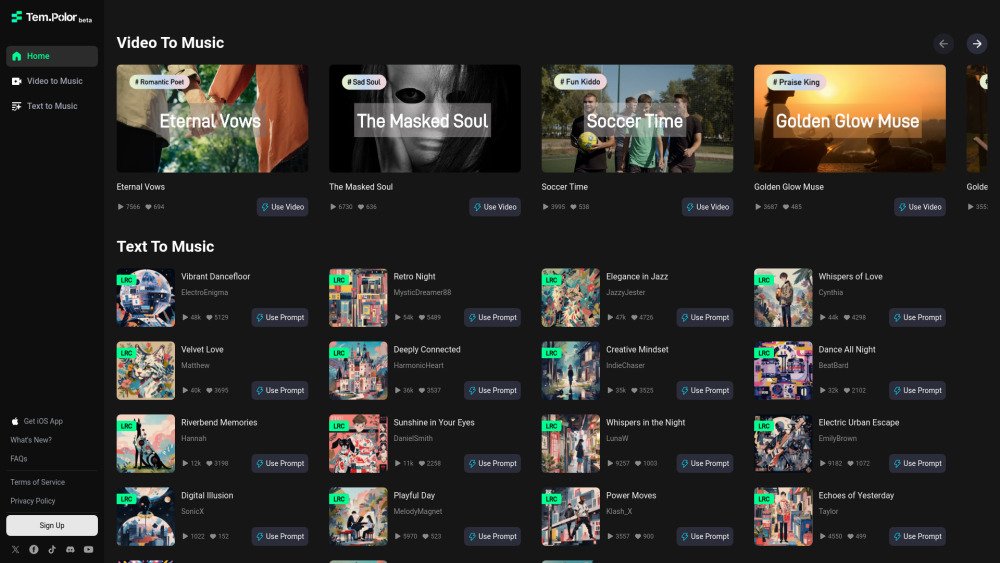
TemPolor is an AI music platform that allows users to generate royalty-free music for various creative projects. It offers AI-generated tracks, seamless licensing, and tools for customizing music to fit specific needs. Users can create music using words, taps, or hums, and the platform provides options for both simple and expert control over the music creation process.
Users can describe their desired vibe in Simple Mode or utilize Expert Mode for full control over soundtrack creation. Additionally, the platform allows users to browse a library of royalty-free music and download tracks for their projects.
TemPolor improves creator efficiency with a flat-rate subscription that includes AI-powered music matching and personalization. A single download grants you unlimited lifetime commercial use of royalty-free tracks.
Yes, TemPolor’s music is royalty-free, allowing you to use tracks in creative projects without recurring licensing fees. Please follow modification guidelines for commercial release or distribution to avoid copyright issues.
Yes, you have full rights to modify AI-generated music, including editing, mixing, adjusting tempo, and adding creative elements. These modified tracks can be used on platforms like YouTube, provided you do not infringe on the copyrights of others.
While purely AI-generated works may not qualify for traditional copyright protection under U.S. rules, you may be eligible for protection if you significantly modify the music with substantial human creativity. You can freely use and monetize the music on most platforms in compliance with local laws. TemPolor uses third-party copyright agencies for checks and provides a certificate of usage rights.
Yes, you can use AI-generated music directly in projects like videos, podcasts, social media, and advertisements during an active subscription. For public release or distribution, ensure you comply with local legal regulations.
Yes, tracks downloaded during your subscription remain yours. While you cannot use them for new projects after the subscription ends, you may continue to reference them for personal purposes.
We update our library daily. Thousands of new songs and sound effects are added each month to ensure you have fresh content to explore.
To manage your renewal, cancel before the next billing date. Navigate to the Subscription page in your Account, click the arrow icon under your Next billing information, select Cancel renewal, and confirm your choice.
We offer refunds if requested via email within 7 days of payment. Requests made after this period are not accepted. For refund inquiries, contact support@tempolor.com.
We do not currently support account transfers. To move membership benefits to a new account, please request a refund for your current subscription and sign up again using your new account.
Go to the top right corner of the page and select Downloads from the dropdown menu. Find the track, click More on the far right, and select Get License. The certificate will be available for download. Note that only active subscribers can download license certificates.
Free plan available.
Use these comparison pages to understand the trade-offs between the models most relevant to TemPolor.
Compare Gemini 1.0 Pro Deprecated and Gemini 2.0 Flash across pricing, context window, capabilities, benchmarks, and API access to choose the better fit for long-context workloads versus long-context workloads.
Compare Gemini 1.0 Pro Deprecated and Gemini 2.5 Flash across pricing, context window, capabilities, benchmarks, and API access to choose the better fit for long-context workloads versus long-context workloads.
Compare Gemini 2.0 Flash Lite and Gemini 2.0 Flash across pricing, context window, capabilities, benchmarks, and API access to choose the better fit for long-context workloads versus long-context workloads.
Compare Gemini 2.5 Flash and Gemini 2.0 Flash across pricing, context window, capabilities, benchmarks, and API access to choose the better fit for long-context workloads versus long-context workloads.

Similar AI tool in the AI Assistant category.
Similar AI tool in the AI Assistant category.
Similar AI tool in the AI Writing Assistants category.
Similar AI tool in the AI Assistant category.
Similar AI tool in the AI Writing Assistants category.
Similar AI tool in the AI Writing Assistants category.
Similar AI tool in the AI Assistant category.
Similar AI tool in the AI Chatbot category.
Similar AI tool in the AI Chatbot category.
Similar AI tool in the AI Chatbot category.
Similar AI tool in the AI Assistant category.
Similar AI tool in the AI Assistant category.