
Free
$0Free plan available.
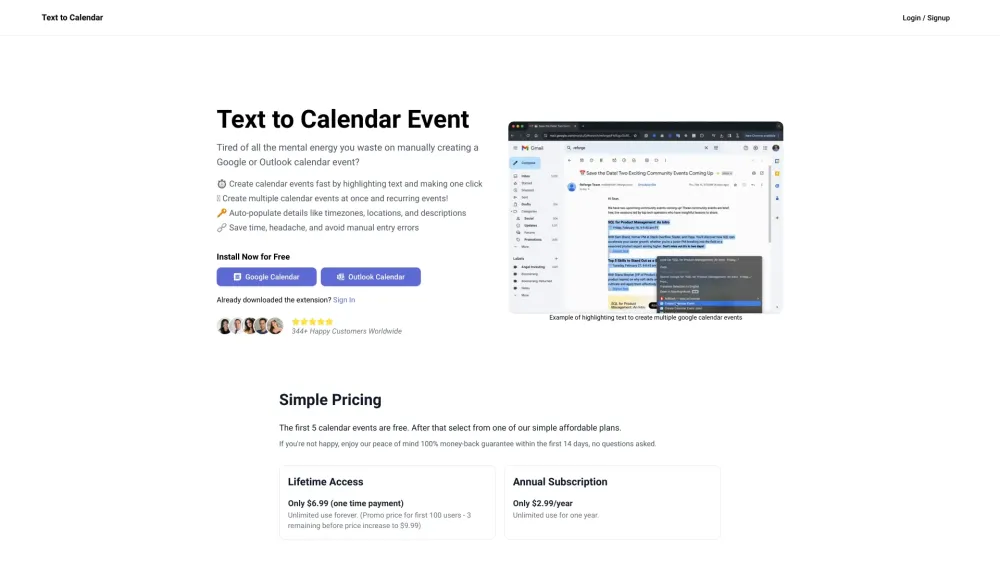
Text to Calendar is a browser extension designed to streamline the process of creating Google or Outlook calendar events. It allows users to highlight text containing event details and automatically populate the calendar event creation form, saving time and reducing manual entry errors. The extension supports creating single and recurring events, as well as populating location, timezone, and event descriptions.
Install the Text to Calendar extension. Highlight the text containing event details on any webpage or email. Click the extension icon to automatically populate a Google or Outlook calendar event creation form with the highlighted information. Review the details, make any necessary adjustments, and save the event.
Text to Calendar lets you highlight text containing event details to automatically generate a Google or Outlook calendar event using the extracted information.
The first 5 calendar events are free. Beyond that, a paid plan is required.
Text to Calendar provides a 100% money-back guarantee within the first 14 days, with no questions asked.
Free plan available.
Use these comparison pages to understand the trade-offs between the models most relevant to Text to Calendar.
Compare Gemini 1.0 Pro Deprecated and Gemini 1.5 Flash Vision Deprecated across pricing, context window, capabilities, benchmarks, and API access to choose the better fit for long-context workloads versus general-purpose AI workloads.
Compare Gemini 1.5 Pro Vision Deprecated and Gemini 1.0 Pro Deprecated across pricing, context window, capabilities, benchmarks, and API access to choose the better fit for general-purpose AI workloads versus long-context workloads.
Compare Gemini 1.0 Pro Vision Deprecated and Gemini 1.5 Flash Vision Deprecated across pricing, context window, capabilities, benchmarks, and API access to choose the better fit for general-purpose AI workloads versus general-purpose AI workloads.
Compare Gemini 1.5 Pro Vision Deprecated and Gemini 1.0 Pro Vision Deprecated across pricing, context window, capabilities, benchmarks, and API access to choose the better fit for general-purpose AI workloads versus general-purpose AI workloads.

Similar AI tool in the AI Copilot category.
Similar AI tool in the AI Assistant category.
Similar AI tool in the AI Assistant category.
Similar AI tool in the AI Productivity Tools category.
Similar AI tool in the AI Assistant category.
Similar AI tool in the AI Assistant category.
Similar AI tool in the AI Assistant category.
Similar AI tool in the AI Assistant category.
Similar AI tool in the AI Chatbot category.
Similar AI tool in the AI Productivity Tools category.
Similar AI tool in the AI Assistant category.
Similar AI tool in the AI Assistant category.