
Free
$0Free plan available.
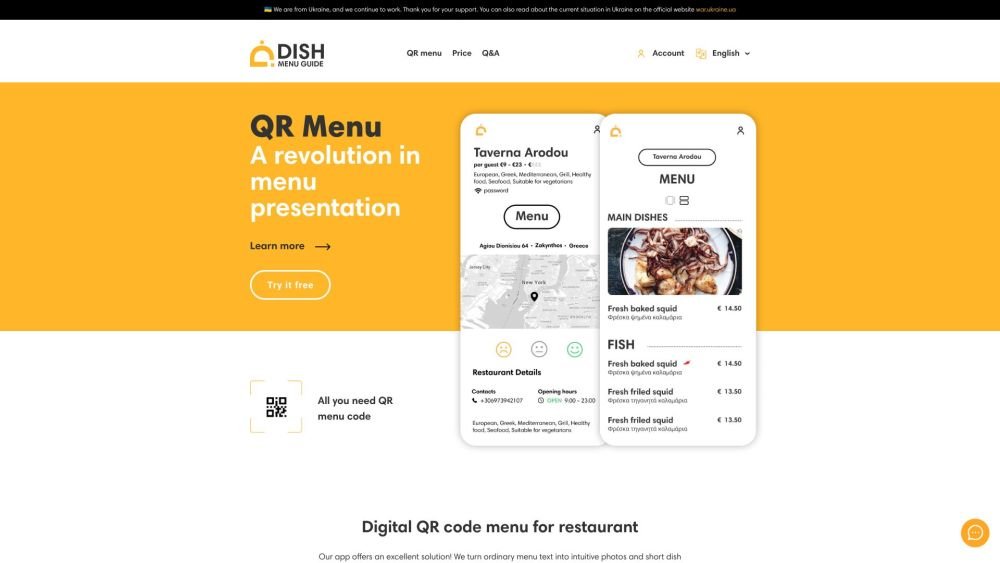
Dish Menu Guide is a service that allows restaurants to create digital QR code menus. It transforms ordinary menu text into intuitive photos and short dish descriptions. The presence of a QR menu with photos increases the average order amount. The QR menu does not require installation, has no ads, and no restrictions on the number of tables and categories in the catalog.
Restaurants can use the service to create a QR code menu that customers scan with their smartphones to view online. The menu supports multiple languages and can be easily updated remotely.
Customers can access the menu instantly by scanning the QR code at their table, eliminating the need to wait for a waiter to provide a physical copy.
Customers can access the menu instantly by scanning the QR code at their table, eliminating the need to wait for a waiter to provide a physical copy.
Customers can access the menu instantly by scanning the QR code at their table, eliminating the need to wait for a waiter to provide a physical copy.
Customers can access the menu instantly by scanning the QR code at their table, eliminating the need to wait for a waiter to provide a physical copy.
Free plan available.
Use these comparison pages to understand the trade-offs between the models most relevant to Dish Menu Guide.
Compare Amazon Nova Pro and Amazon Nova Lite across pricing, context window, capabilities, benchmarks, and API access to choose the better fit for tool-augmented workflows versus tool-augmented workflows.
Compare Amazon Nova Lite and Amazon Nova Micro across pricing, context window, capabilities, benchmarks, and API access to choose the better fit for tool-augmented workflows versus tool-augmented workflows.
Compare Amazon Nova Lite and Mistral Medium 3 across pricing, context window, capabilities, benchmarks, and API access to choose the better fit for tool-augmented workflows versus tool-augmented workflows.
Compare Amazon Nova Lite and Mistral Small 3.1 (25.03) across pricing, context window, capabilities, benchmarks, and API access to choose the better fit for tool-augmented workflows versus cost-efficient scale.

Similar AI tool in the Other category.
Similar AI tool in the AI Productivity Tools category.
Similar AI tool in the Other category.
Similar AI tool in the Other category.
Similar AI tool in the Other category.
Similar AI tool in the Other category.
Similar AI tool in the Other category.
Similar AI tool in the Other category.