
Free
$0Free plan available.
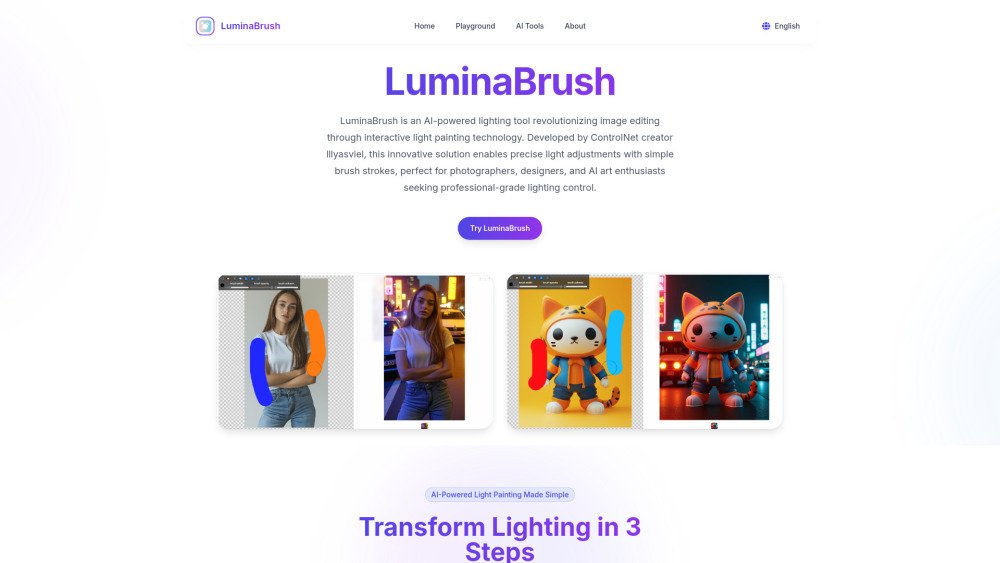
LuminaBrush is an AI-powered lighting tool that uses interactive light painting technology to streamline image editing. Created by the developer of ControlNet, it allows users to make precise lighting adjustments with simple brush strokes. It is designed for photographers, designers, and AI art enthusiasts who need professional-grade lighting control, offering real-time previews to enhance photography, correct lighting issues, and refine AI-generated images.
1. Upload your image to the LuminaBrush interface. 2. Apply lighting effects using the color-coded brush tools. 3. Preview your changes in real-time and export the final enhanced image.
LuminaBrush is an AI-powered lighting tool that uses interactive light painting technology to enhance photos. Developed by the creators of ControlNet, it provides professional-grade lighting control through simple brush strokes, making it suitable for photographers, designers, and AI art creators.
The two-stage AI process analyzes the existing lighting in your image before applying your custom light painting while maintaining important details. The brush system uses color codes to interpret your intent, such as using warm tones for sunlight or cool hues for moonlight and neon effects.
Yes, LuminaBrush is designed for cross-platform workflows. You can export lighting layers as PNG masks for use in Photoshop or enhance images generated by Stable Diffusion or DALL-E while preserving their original resolution and detail.
The web version is compatible with modern browsers like Chrome, Firefox, and Safari that support WebGL 2.0. For processing 4K images, we recommend using a device with at least 8GB of RAM and a dedicated GPU to ensure smooth performance.
Yes. Professional plans include commercial licenses for use in advertising, real estate visualization, and product photography. The AI is designed to maintain material reflectivity and skin textures, which are essential for professional work.
Yes, the advanced algorithms in LuminaBrush support high dynamic range lighting. You can combine multiple light sources with adjustable intensity settings from 0% to 200% to create realistic highlights and shadows without causing overexposure.
Free plan available.
Use these comparison pages to understand the trade-offs between the models most relevant to LuminaBrush.
Compare Amazon Nova Pro and Amazon Nova Lite across pricing, context window, capabilities, benchmarks, and API access to choose the better fit for tool-augmented workflows versus tool-augmented workflows.
Compare Amazon Nova Lite and Amazon Nova Micro across pricing, context window, capabilities, benchmarks, and API access to choose the better fit for tool-augmented workflows versus tool-augmented workflows.
Compare Amazon Nova Lite and Mistral Medium 3 across pricing, context window, capabilities, benchmarks, and API access to choose the better fit for tool-augmented workflows versus tool-augmented workflows.
Compare Amazon Nova Lite and Mistral Small 3.1 (25.03) across pricing, context window, capabilities, benchmarks, and API access to choose the better fit for tool-augmented workflows versus cost-efficient scale.