Online Audio Converter

1
5 0 Reviews 1 Saved
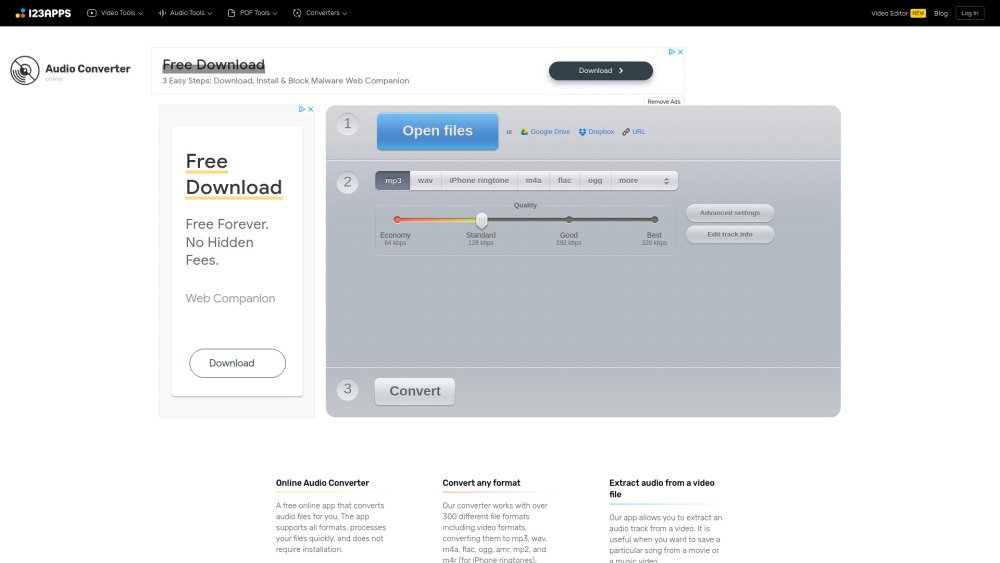
Introduction: Online Audio Converter: Online Audio Converter is a free online app that converts audio files for you. The app supports all formats, processes your files quickly, and does not require installation. It works with over 300 different file formats including video formats, converting them to mp3, wav, m4a, flac, ogg, amr, mp2, and m4r (for iPhone ringtones). You can extract an audio track from a video file. You can configure the quality, bitrate, frequency, and number of channels, apply reverse playback or fade in, or even remove a voice from the audio track. The app can convert multiple files simultaneously in a batch, saving them in a ZIP archive to speed up downloading. You can change the track’s name, artist, album, year and genre. Tags are supported for mp3, ogg, flac, wav. The app is easy to use: upload the original file, choose your desired format and quality, and download the output file to your computer.
Added on: Apr 10 2025
Monthly Visitors: 4.6M

Online Audio Converter Product Information

What is Online Audio Converter?

Online Audio Converter is a free online app that converts audio files for you. The app supports all formats, processes your files quickly, and does not require installation. It works with over 300 different file formats including video formats, converting them to mp3, wav, m4a, flac, ogg, amr, mp2, and m4r (for iPhone ringtones). You can extract an audio track from a video file. You can configure the quality, bitrate, frequency, and number of channels, apply reverse playback or fade in, or even remove a voice from the audio track. The app can convert multiple files simultaneously in a batch, saving them in a ZIP archive to speed up downloading. You can change the track’s name, artist, album, year and genre. Tags are supported for mp3, ogg, flac, wav. The app is easy to use: upload the original file, choose your desired format and quality, and download the output file to your computer.

How to use Online Audio Converter?

Upload the original file, choose your desired format and quality, and download the output file to your computer.

Online Audio Converter's Core Features

  • Audio conversion to various formats
  • Audio extraction from video files
  • Batch conversion support
  • Tag support for audio files
  • Advanced audio settings configuration

Online Audio Converter Use Cases

#1 Convert music files to different formats for compatibility.
#2 Extract audio from a movie or music video.
#3 Prepare audio files for use as iPhone ringtones.
#4 Adjust audio quality and settings for specific devices or applications.

FAQ from Online Audio Converter

How to extract sound from a video? +

Our app allows you to extract an audio track from a video. It is useful when you want to save a particular song from a movie or a music video.

Different types of audio formats explained +

Help Different types of audio formats explained

Advanced mp3 converting settings explained +

Help Advanced mp3 converting settings explained

Related Model Comparison Pages

Use these comparison pages to understand the trade-offs between the models most relevant to Online Audio Converter.

Compare Gemini 1.0 Pro Deprecated and Gemini 2.0 Flash across pricing, context window, capabilities, benchmarks, and API access to choose the better fit for long-context workloads versus long-context workloads.

Compare Gemini 1.0 Pro Deprecated and Gemini 2.5 Flash across pricing, context window, capabilities, benchmarks, and API access to choose the better fit for long-context workloads versus long-context workloads.

Compare Gemini 2.0 Flash Lite and Gemini 2.0 Flash across pricing, context window, capabilities, benchmarks, and API access to choose the better fit for long-context workloads versus long-context workloads.

Compare Gemini 2.5 Flash and Gemini 2.0 Flash across pricing, context window, capabilities, benchmarks, and API access to choose the better fit for long-context workloads versus long-context workloads.