
Free
$0Free plan available.
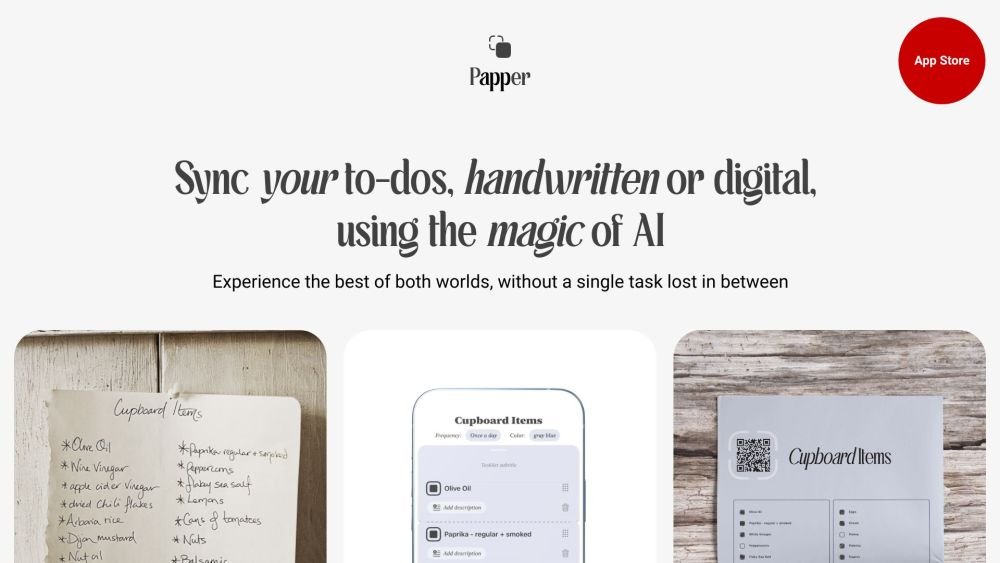
Papper is an iOS application designed to help you stay organized and productive. It enables you to convert handwritten notes into digital to-do lists, create and print custom checklists, scan your progress from physical lists, and access a variety of pre-made checklists on diverse subjects. The app uses AI to sync your handwritten and digital tasks, allowing you to upload handwritten to-dos or print digital tasks and sync your handwritten marks back to the app.
Write your to-dos by hand and upload them to the app, or print digital tasks and sync your handwritten marks back. You can also create and manage task lists directly within the app or sync them with Apple Reminders. Simply take a photo of your handwritten tasks, and Papper's AI will digitize them. When you mark tasks on your printouts, Papper will automatically update your progress in the app.
Papper is an iOS application designed to help you stay organized and productive. It allows you to convert handwritten notes into digital to-do lists, create and print your own checklists, scan your progress from these lists, and access a wide range of pre-made checklists on various subjects.
Papper uses OCR (Optical Character Recognition) and AI technology to scan your handwritten notes and convert them into digital to-do lists.
Yes. Papper allows you to scan your handwritten marks from printed checklists, which automatically syncs and updates your task progress within the app.
Papper provides a variety of pre-made checklists covering topics such as wellbeing, sports, health, psychology, productivity, and more.
Papper is compatible with iOS devices running iOS 16 or later.
Yes, Papper is free to download and use. Optional in-app purchases are available for access to additional features and content.
Free plan available.
Use these comparison pages to understand the trade-offs between the models most relevant to Papper.
Compare Amazon Nova Pro and Amazon Nova Lite across pricing, context window, capabilities, benchmarks, and API access to choose the better fit for tool-augmented workflows versus tool-augmented workflows.
Compare Amazon Nova Lite and Amazon Nova Micro across pricing, context window, capabilities, benchmarks, and API access to choose the better fit for tool-augmented workflows versus tool-augmented workflows.
Compare Amazon Nova Lite and Mistral Medium 3 across pricing, context window, capabilities, benchmarks, and API access to choose the better fit for tool-augmented workflows versus tool-augmented workflows.
Compare Amazon Nova Lite and Mistral Small 3.1 (25.03) across pricing, context window, capabilities, benchmarks, and API access to choose the better fit for tool-augmented workflows versus cost-efficient scale.

Similar AI tool in the AI Assistant category.
Similar AI tool in the AI Assistant category.
Similar AI tool in the AI Assistant category.
Similar AI tool in the AI Productivity Tools category.
Similar AI tool in the AI Assistant category.
Similar AI tool in the AI Assistant category.
Similar AI tool in the AI Assistant category.
Similar AI tool in the AI Productivity Tools category.
Similar AI tool in the AI Assistant category.
Similar AI tool in the AI Chatbot category.
Similar AI tool in the AI Assistant category.
Similar AI tool in the AI Assistant category.