
Free
$0Free plan available.
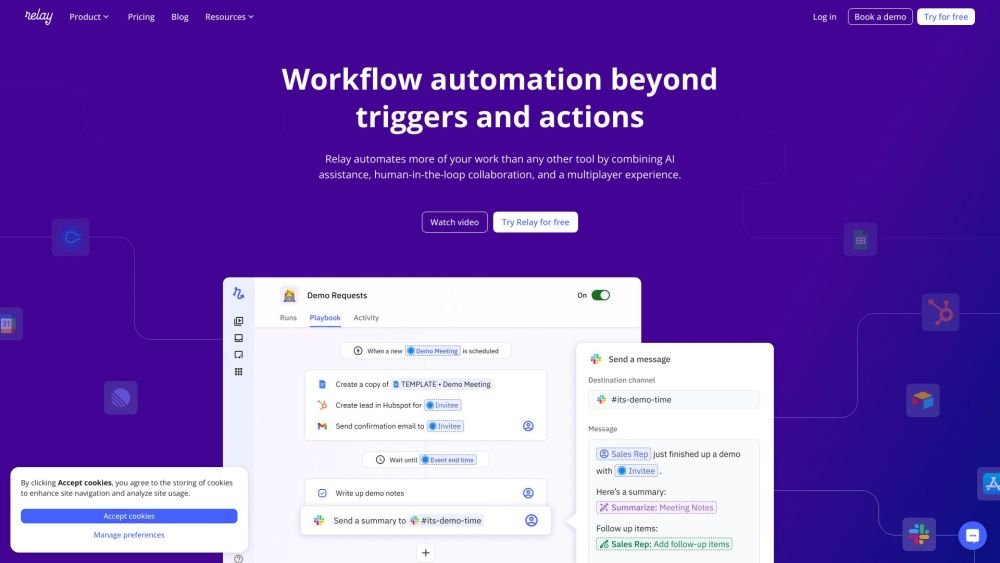
Relay.app is a platform to create AI agents that work for you across 100+ apps. It offers workflow automation beyond triggers and actions with one-click AI assistance, human-in-the-loop collaboration, and a multiplayer experience. Users can connect Gmail, Slack, Notion, and 100+ other apps in minutes to automate tasks.
Connect your preferred apps, build multi-step workflows using AI assistance, and incorporate teammates for human checkpoints when necessary. You can begin for free and utilize templates to automate a variety of tasks.
Relay.app plans are designed to scale with your needs, and you can change your plan at any time. All plans include full access to workflow automation features, with varying limits on steps and AI credits. The primary distinction is whether you are using the platform as an individual or as part of a team. If you are unsure, our Free plan provides 200 automated steps and 500 AI credits per month. The Professional plan is designed for individuals, starting at $19/month for 750 steps and 5,000 AI credits, with costs scaling based on usage. The Team plan is for collaborative work, offering 2,000 steps and 5,000 AI credits per month with no limit on the number of teammates. For organizations with specific needs, such as custom integrations or advanced security requirements, please contact sales@relay.app to discuss an Enterprise plan.
A user is defined as anyone in your Relay.app workspace who needs to edit playbooks, execute automations using their own credentials, or perform human-in-the-loop actions, such as inputting data, approving workflow runs, or completing assigned tasks.
A step is counted whenever a playbook successfully completes an action. This includes automated actions in external apps (e.g., sending a Slack message or updating a HubSpot contact), Utility steps (e.g., data transformation), Wait steps, and the activation of a Human-in-the-Loop step. Trigger polling does not count toward your step usage.
No. Checking for new data—such as identifying changes to a Salesforce deal or new files in a Google Drive folder—does not count as a step. Only successfully completed actions count toward your usage.
All plans include monthly AI credits for performing actions with models like GPT, Claude, and Gemini. These credits are used for tasks such as data extraction, text summarization, and audio transcription. If you exceed your included credits, you can purchase more. Alternatively, if you have a paid account with another AI service, you can connect your own credentials to avoid using Relay.app credits. The platform provides indicators to help you understand the cost of different models and how many credits each step requires. Refer to our support documentation for details on credit calculations.
Relay.app supports over 100 third-party applications, with new integrations added regularly. You can view the full list at relay.app/apps. If you require an integration that is not currently available, you can request or upvote it on our public board at request.relay.app.
All integrations are available on every plan; there are no 'premium' integrations that require extra fees. While all integrations are included, please note that faster polling times are reserved for paid plans.
Our team provides support with a goal of responding within 24 hours and resolving minor issues within 48 hours. You can report issues or ask for help using the in-product feedback tool by clicking the question mark icon in the bottom right corner. Enterprise customers have access to a dedicated shared Slack channel. Additionally, you can join our Slack community to discuss best practices, or contact us at support@relay.app for general inquiries. If you need assistance with complex workflow setups, we can connect you with a consulting partner.
You can manage or cancel your plan at any time by visiting relay.app/billing. Upgrades take effect immediately with a prorated charge for the billing cycle. If you downgrade or cancel, you will retain access to your current plan features until the end of your existing billing cycle.
Free plan available.
Use these comparison pages to understand the trade-offs between the models most relevant to Relay.app.
Compare Gemini 1.0 Pro Deprecated and Gemini 2.0 Flash across pricing, context window, capabilities, benchmarks, and API access to choose the better fit for long-context workloads versus long-context workloads.
Compare Gemini 1.0 Pro Deprecated and Gemini 2.5 Flash across pricing, context window, capabilities, benchmarks, and API access to choose the better fit for long-context workloads versus long-context workloads.
Compare Gemini 2.0 Flash Lite and Gemini 2.0 Flash across pricing, context window, capabilities, benchmarks, and API access to choose the better fit for long-context workloads versus long-context workloads.
Compare Gemini 2.5 Flash and Gemini 2.0 Flash across pricing, context window, capabilities, benchmarks, and API access to choose the better fit for long-context workloads versus long-context workloads.

Similar AI tool in the AI Assistant category.
Similar AI tool in the AI Chatbot category.
Similar AI tool in the AI Assistant category.
Similar AI tool in the AI Chatbot category.
Similar AI tool in the AI Assistant category.
Similar AI tool in the AI API category.
Similar AI tool in the AI Marketing category.
Similar AI tool in the AI Assistant category.
Similar AI tool in the AI Chatbot category.
Similar AI tool in the AI Chatbot category.
Similar AI tool in the AI Marketing category.
Similar AI tool in the Large Language Models (LLMs) category.