
Free
$0Free plan available.
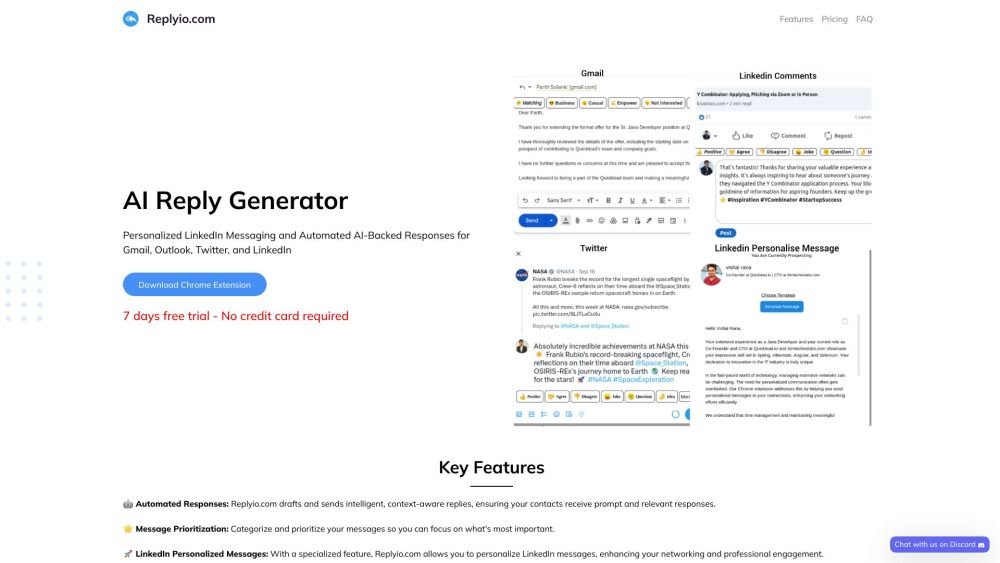
Replyio is an AI-powered communication assistant designed to streamline interactions across Gmail, Outlook, LinkedIn, and Twitter. It features personalized LinkedIn messaging and automated AI-driven responses to boost productivity and engagement. Key capabilities include automated replies, message prioritization, multilingual support, and robust data security, with no credit card required to begin.
To use Replyio, install the Chrome extension and connect it to your Gmail, Outlook, LinkedIn, or Twitter accounts. The extension assists in summarizing emails, drafting personalized messages, and automating responses. You can customize templates and adjust message tones to align with your preferred communication style.
Yes, Replyio offers a 7-day free trial.
Yes, you may cancel your subscription at any time without incurring additional fees.
It supports all widely spoken languages; simply specify your desired language in your text prompt.
You can reach our support team via email or through our Discord channel.
In Gmail, the extension can generate summaries of open emails. When you click the reply button, the Replyio popup appears to draft a relevant response based on the email content. You can also use the extension when composing new emails and modify the generated text as needed.
In Outlook, the extension can generate summaries of open emails. When you click the reply button, the Replyio popup appears to draft a relevant response based on the email content. You can also use the extension when composing new emails and modify the generated text as needed.
On Twitter (X), you can generate a reply or comment on any post by clicking the "Post your reply" button. The reply is generated and inserted automatically, with options available to modify the text.
On LinkedIn, you can generate a reply or comment on any post by clicking the "Add a comment..." or "Reply" button. The reply is generated and inserted automatically, with options available to modify the text.
On LinkedIn, first create a template to serve as the basis for your message and select your desired tone. You can include your own content to guide the generation process, then copy the result to your clipboard. The extension also allows you to send personalized messages directly from the connection page.
Free plan available.
Use these comparison pages to understand the trade-offs between the models most relevant to Replyio.
Compare Gemini 1.0 Pro Deprecated and Gemini 2.0 Flash across pricing, context window, capabilities, benchmarks, and API access to choose the better fit for long-context workloads versus long-context workloads.
Compare Gemini 1.0 Pro Deprecated and Gemini 2.5 Flash across pricing, context window, capabilities, benchmarks, and API access to choose the better fit for long-context workloads versus long-context workloads.
Compare Gemini 2.0 Flash Lite and Gemini 2.0 Flash across pricing, context window, capabilities, benchmarks, and API access to choose the better fit for long-context workloads versus long-context workloads.
Compare Gemini 2.5 Flash and Gemini 2.0 Flash across pricing, context window, capabilities, benchmarks, and API access to choose the better fit for long-context workloads versus long-context workloads.

Similar AI tool in the AI Lead Generation category.
Similar AI tool in the AI Social Media Post Generator category.
Similar AI tool in the AI Assistant category.
Similar AI tool in the AI Chatbot category.
Similar AI tool in the AI Writing Assistants category.
Similar AI tool in the AI Chatbot category.
Similar AI tool in the AI Assistant category.
Similar AI tool in the AI Productivity Tools category.
Similar AI tool in the AI Chatbot category.
Similar AI tool in the AI Design Generator category.
Similar AI tool in the AI Image Generator category.
Similar AI tool in the AI Art Generator category.