
Free
$0Free plan available.
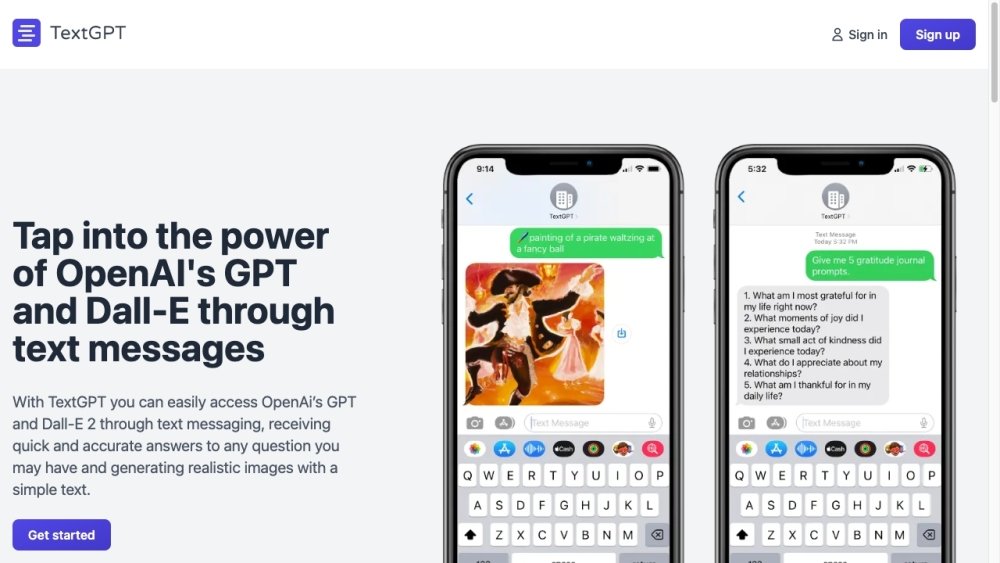
TextGPT is a messaging application that provides access to OpenAI's GPT and DALL-E 2 capabilities directly through text messages. Users can submit questions to receive AI-generated answers or provide prompts to generate realistic images. Once registered, you can interact with the service by sending text messages to a designated number.
After signing up, send your questions or prompts to the provided number. To generate images, include the paintbrush emoji followed by your prompt. You can also send an image to TextGPT to modify it using Stable Diffusion.
TextGPT is a messaging application that allows you to access the AI capabilities of OpenAI's GPT directly through text messages, providing quick and accurate answers to your questions.
TextGPT utilizes OpenAI's GPT-4 (gpt-4-0125-preview) model, an advanced natural language processing model trained through April 2023. This enables the service to understand and respond to a wide range of inquiries with comprehensive answers.
TextGPT is simple to use; just open your text messaging app and send your question to the provided number. The service uses advanced natural language processing to deliver an accurate response.
You can ask TextGPT a wide variety of questions, whether you are seeking information on a specific topic, need assistance with a problem, or want to learn something new.
Yes, the advanced natural language processing capabilities of TextGPT allow it to understand and respond to complex questions effectively.
Include the paintbrush emoji (🖌️) followed by your prompt and send it to receive your image. Example: 🖌️ surrealist image of a dog park carnival.
Include the paintbrush emoji (🖼️) followed by your prompt and send it to receive your image. Example: 🖼️ a rocket-ship launching from rolling greens with blue daisies and weeping willow trees under a blue alien sky, artstation, masterful, ghibli.
Send the image you wish to modify along with your prompt. For example, you can send an image followed by the prompt: 'sketchy crayon outline on old paper of a rocket-ship launching from rolling greens with blue daisies and weeping willow trees under a blue alien sky.'
No, TextGPT does not save your questions or answers; these are only stored within your personal text message history.
Free plan available.
Use these comparison pages to understand the trade-offs between the models most relevant to TextGPT.
Compare GPT 5.4 and GPT 5.4 Pro across pricing, context window, capabilities, benchmarks, and API access to choose the better fit for long-context workloads versus long-context workloads.
Compare GPT 5.5 and GPT 5.4 across pricing, context window, capabilities, benchmarks, and API access to choose the better fit for long-context workloads versus long-context workloads.
Compare GPT 5.5 and Claude 4.6 Opus across pricing, context window, capabilities, benchmarks, and API access to choose the better fit for long-context workloads versus long-context workloads.
Compare GPT 5.5 and Claude 4.6 Sonnet across pricing, context window, capabilities, benchmarks, and API access to choose the better fit for long-context workloads versus long-context workloads.

Similar AI tool in the AI Assistant category.
Similar AI tool in the AI Assistant category.
Similar AI tool in the AI Assistant category.
Similar AI tool in the AI Productivity Tools category.
Similar AI tool in the AI Chatbot category.
Similar AI tool in the AI Image Generator category.
Similar AI tool in the AI Assistant category.
Similar AI tool in the AI Chatbot category.
Similar AI tool in the AI Chatbot category.
Similar AI tool in the AI Image Generator category.
Similar AI tool in the AI Image Generator category.
Similar AI tool in the AI Assistant category.