
FREE
$$ 0Pricing from the source listing.
TTSMaker is a free online text-to-speech tool that supports unlimited usage, including commercial use. It offers over 200 AI voices and supports multiple languages. TTSMaker can convert text to speech, allowing users to listen online or download audio files in MP3 or WAV format. It provides various voice styles and settings for customization, such as voice speed, volume, and pitch adjustment.
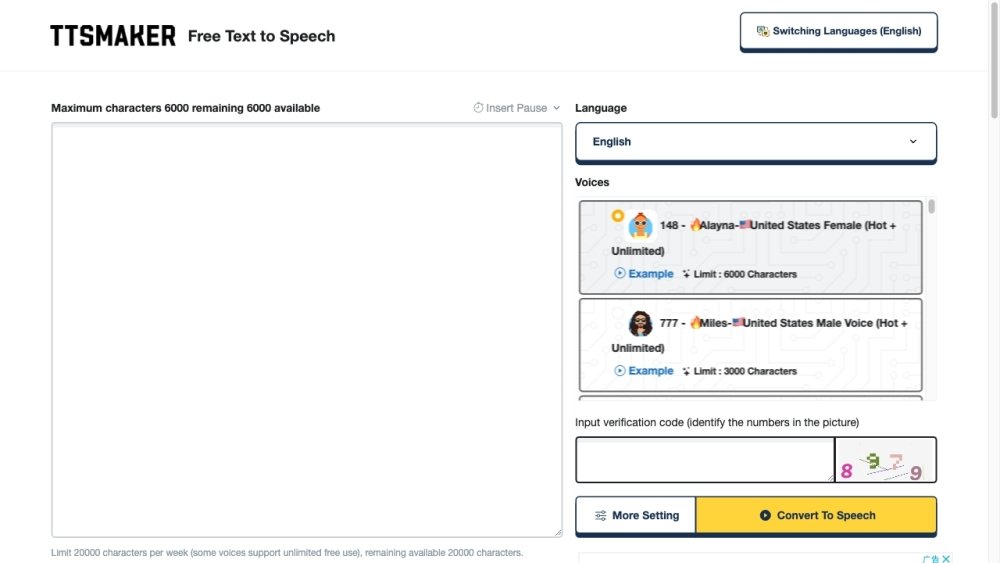
To use TTSMaker, enter your text, select a language and voice, and click 'Convert to Speech'. You can adjust settings like speed and volume in the 'More Settings' menu. Once finished, you can listen to the audio online or download the file.
TTSMaker is an online text-to-speech tool that converts text into audio, which you can then play or download.
Enter your text, select your preferred language and voice, and then initiate the conversion process.
Yes, it is free to use.
Yes, you may use the audio files for any purpose, provided it does not violate local laws.
You can reach out to us via email or by leaving a message.
Yes, TTSMaker offers a free plan with a limit of 20,000 characters per week. For users needing more, TTSMaker Pro provides higher character limits, advanced sound editing and configuration tools, faster conversion speeds, and priority customer support.
Yes, you can. We grant users full copyright ownership of the synthesized audio files. Please refer to our voice copyright policy for details.
No, there are no fees for downloading audio files. Once converted, you can download your file as many times as needed within 24 hours at no extra cost.
Yes, we provide email support with a typical response time of 24-72 hours. We are actively working to improve our support services for all users.
Pricing from the source listing.
Pricing from the source listing.
Pricing from the source listing.
Pricing from the source listing.
Use these comparison pages to understand the trade-offs between the models most relevant to TTSMaker.
Compare Gemini 1.0 Pro Deprecated and Gemini 2.0 Flash across pricing, context window, capabilities, benchmarks, and API access to choose the better fit for long-context workloads versus long-context workloads.
Compare Gemini 1.0 Pro Deprecated and Gemini 2.5 Flash across pricing, context window, capabilities, benchmarks, and API access to choose the better fit for long-context workloads versus long-context workloads.
Compare Gemini 2.0 Flash Lite and Gemini 2.0 Flash across pricing, context window, capabilities, benchmarks, and API access to choose the better fit for long-context workloads versus long-context workloads.
Compare Gemini 2.5 Flash and Gemini 2.0 Flash across pricing, context window, capabilities, benchmarks, and API access to choose the better fit for long-context workloads versus long-context workloads.

Similar AI tool in the AI Video Generator category.
Similar AI tool in the AI Assistant category.
Similar AI tool in the AI Marketing category.
Similar AI tool in the AI Chatbot category.
Similar AI tool in the AI Writing Assistants category.
Similar AI tool in the AI Image Generator category.
Similar AI tool in the AI Chatbot category.
Similar AI tool in the AI Video Generator category.
Similar AI tool in the AI Image Generator category.
Similar AI tool in the AI Video Generator category.
Similar AI tool in the AI Writing Assistants category.
Similar AI tool in the AI Writing Assistants category.