AnyToSpeech

3
5 0 Reviews 3 Saved
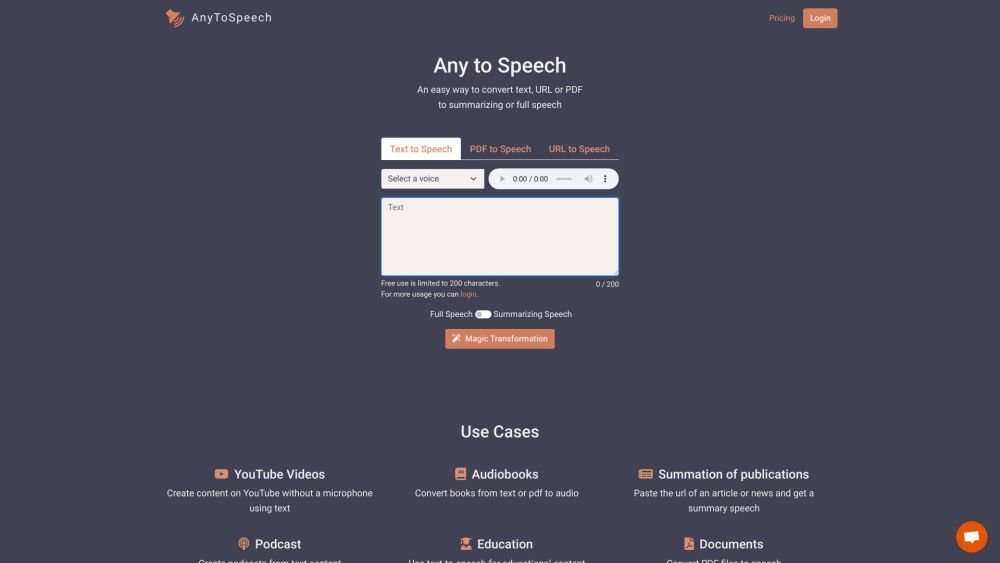
Introduction: AnyToSpeech is an online text-to-speech converter that transforms text, PDFs, and URLs into natural-sounding audio. It provides a range of voices and styles for personalization, allowing users to listen to generated audio instantly. The platform supports the creation of audiobooks, MP3 files, podcasts, and voiceovers.
Monthly Visitors: 27.1K
Social & Email: YouTube

AnyToSpeech Product Information

What is AnyToSpeech?

AnyToSpeech is an online text-to-speech converter that allows users to convert text, PDFs, and URLs into natural-sounding audio. It offers a variety of voices and styles to personalize the audio, and users can listen to the audio immediately. It supports creating audiobooks, MP3s, podcasts, and voiceovers.

How to use AnyToSpeech?

Users can convert text to audio by pasting text, uploading a PDF, DOCX, or TXT file, selecting a preferred voice and style, and clicking 'Create your audio'. The resulting audio can be played directly in the browser or downloaded as an MP3 file.

AnyToSpeech's Core Features

  • Text to speech conversion
  • PDF to MP3 conversion
  • Multiple voice options
  • Customizable voice styles
  • Support for various file formats (text, PDF, DOCX, TXT)
  • MP3 audio download

AnyToSpeech Use Cases

#1 Creating audiobooks from PDFs
#2 Generating voiceovers for videos
#3 Producing podcasts
#4 Listening to documents hands-free while commuting
#5 Converting study material into audio for easier learning

FAQ from AnyToSpeech

What is AnyToSpeech's text-to-speech service? +

AnyToSpeech converts written text into natural-sounding audio using AI technology. You can convert plain text, documents, or PDFs into speech using various voice options and download the result as an MP3 file.

How do I convert a PDF to MP3? +

Upload your PDF file using our converter, select your preferred voice, adjust the speaking rate if needed, and click 'Convert.' Once processing is complete, you can download your file as an MP3 or listen to it directly in your browser.

What file formats can I convert to speech? +

Our service supports multiple formats, including plain text, PDF, DOCX, and TXT. Our converter is frequently used to turn documents, books, and research papers into audio content.

How natural do the AI voices sound? +

Our text-to-speech technology uses advanced neural networks to generate highly natural-sounding voices that mimic human speech, including proper intonation, emphasis, and pacing.

Is there a free trial for the text-to-speech service? +

Yes, you can try our text-to-speech service for free without registration or a credit card, allowing you to test the quality before purchasing.

What happens to my unused characters each month? +

Unused characters roll over to the next month for subscribers. For one-time purchases, characters never expire and remain available indefinitely.

How large of a PDF can I convert to MP3? +

Our PDF to MP3 converter handles documents of various sizes. Conversion time depends on the document length, and our system is optimized for efficient processing.

Can I customize the voice in my PDF to MP3 conversion? +

Yes, you can choose from multiple voices with different accents and tones.

Is this a one-time payment or subscription? +

We offer both options. By default, you can make a one-time payment for a character package that never expires. If you prefer regular monthly credits, you can select the 'Monthly' tab to sign up for a subscription plan.

What is your refund policy? +

If you have not used the service, all payments are fully refundable within 7 days. Please contact our support team for assistance.

AnyToSpeech Pricing

Free

$0

Free plan available.

Related Model Comparison Pages

Use these comparison pages to understand the trade-offs between the models most relevant to AnyToSpeech.

Compare Gemini 1.0 Pro Deprecated and Gemini 2.5 Flash across pricing, context window, capabilities, benchmarks, and API access to choose the better fit for long-context workloads versus long-context workloads.

Compare Gemini 2.5 Flash and Gemini 2.0 Flash across pricing, context window, capabilities, benchmarks, and API access to choose the better fit for long-context workloads versus long-context workloads.

Compare Gemini 2.0 Flash Lite and Gemini 2.5 Flash across pricing, context window, capabilities, benchmarks, and API access to choose the better fit for long-context workloads versus long-context workloads.

Compare Gemini 1.0 Pro Deprecated and Gemini 1.5 Flash Deprecated across pricing, context window, capabilities, benchmarks, and API access to choose the better fit for long-context workloads versus general-purpose AI workloads.

You Might Also Like

Yapping - Chrome Extension

Yapping - Chrome Extension

AI Chatbot

Yapping is a Chrome extension that enables voice-based interaction with ChatGPT, removing the need for manual typing. It provides access to premium features at a lower cost by allowing users to integrate their own OpenAI API key.

Contact N/A Views
Details
Read to Me - Chrome Extension

Read to Me - Chrome Extension

AI Text-to-Speech

Read to Me is a Chrome extension that acts as a natural reader, offering text-to-speech (TTS) and read-aloud capabilities. It enables users to listen to articles, web pages, and other text-based content for improved accessibility and convenience.

Contact N/A Views
Details
ViiTor - Chrome Extension

ViiTor - Chrome Extension

Large Language Models (LLMs)

ViiTor is a Chrome extension that provides real-time audio transcription and translation for live broadcasts, online videos, and virtual meetings, allowing users to display bilingual subtitles.

Contact N/A Views
Details
AI-powered real-time call assistant - Chrome Extension

AI-powered real-time call assistant - Chrome Extension

AI Assistant

This AI-powered Chrome extension acts as a real-time call assistant for Google Meet, Zoom, and MS Teams. It offers live transcription, meeting summarization, and action item extraction to help you stay productive. Additionally, it provides real-time feedback on your speaking style and clarity to improve communication effectiveness.

Contact N/A Views
Details
VSX Extension - Chrome Extension

VSX Extension - Chrome Extension

AI Chatbot

The VSX Extension is a Chrome extension designed to improve your learning process through integrated quiz generation and chatbot capabilities. This tool offers interactive quizzes and conversational support to assist with your educational needs.

Contact N/A Views
Details
Summarize AI - Chrome Extension

Summarize AI - Chrome Extension

AI Productivity Tools

Summarize AI is a browser extension that provides concise insights from online content, such as videos and news articles. By activating the extension on any webpage, users can generate quick summaries to save time and improve content comprehension.

Contact N/A Views
Details
Gamma AI - Chrome Extension

Gamma AI - Chrome Extension

AI Translate

Gamma AI is an AI-powered tool designed to help users quickly generate professional presentations, documents, and webpages. By automating content generation, design, and formatting, it enables individuals and teams to produce high-quality materials without requiring advanced design skills. The platform includes various templates and customization tools to ensure outputs align with specific branding and project requirements.

Contact N/A Views
Details
Real-time Meeting Assistant - Chrome Extension

Real-time Meeting Assistant - Chrome Extension

AI Productivity Tools

The Real-time Meeting Assistant Chrome extension monitors your meetings, courses, and lectures to provide real-time answers, idea generation, and more.

Contact N/A Views
Details
Groq Cloud API - Chrome Extension

Groq Cloud API - Chrome Extension

AI Productivity Tools

The Groq Cloud API Chrome extension provides developers with access to the Groq LPU™ Inference Engine, facilitating high-speed, efficient execution of large language models (LLMs). This API enables low-latency inference, making it suitable for real-time applications like chatbots, search engines, and content generation tools. By utilizing the Groq LPU™ architecture, developers can achieve faster inference times than traditional CPU or GPU setups, enhancing user experience and lowering operational costs.

Contact N/A Views
Details
Pebble - Chrome Extension

Pebble - Chrome Extension

AI Assistant

Pebble is an AI-powered browser extension designed to assist you in actively reading and watching online content.

Contact N/A Views
Details
SummarAIze

SummarAIze

AI Summarizer

SummarAIze repurposes podcast episodes, webinars, and other video content into social media posts, emails, and more. It helps scale your content strategy by converting audio and video into shareable formats like summaries, quotes, and social updates. Key features include Audio to Text, Video to Text, video repurposing, and a podcast transcript generator.

Contact -- Views
Details
Sadako AI

Sadako AI

AI Assistant

Sadako AI is an all-in-one assistant designed to help you generate SEO-optimized articles and custom images. It serves as a comprehensive tool for content creation, offering specialized functions for SEO writing and image generation based on your specific requirements.

Contact -- Views
Details