
Free
$0Free plan available.
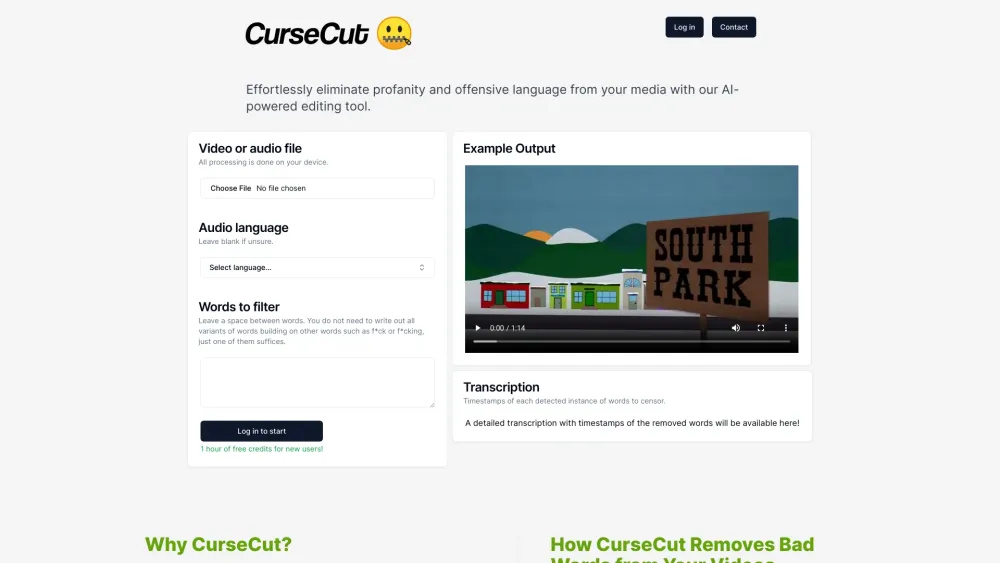
CurseCut is an AI-powered tool designed to detect and mute profanity and other unwanted keywords from audio and video files. It allows users to easily create family-friendly, professional content by filtering out offensive language. The tool offers customizable filtering capabilities, enabling users to define which words are considered inappropriate based on their specific needs and preferences.
Upload your audio or video file, select the language (or leave it blank if you are unsure), and provide a list of words you wish to filter. CurseCut will automatically detect and mute or bleep those segments, allowing you to download the processed file.
All processing occurs locally on your device, ensuring your files never leave your computer.
CurseCut supports various video and audio formats, including .mp4, .mov, .avi, .wmv, .mkv, .flv, .mp3, .wav, .aac, .flac, and .ogg.
Detection accuracy depends on audio quality and the completeness of your custom word list. Using separate audio tracks is recommended for improved results.
Yes, CurseCut supports transcription and censorship across many languages, including Afrikaans, Arabic, Armenian, Azerbaijani, Belarusian, Bosnian, Bulgarian, Catalan, Chinese, Croatian, Czech, Danish, Dutch, English, Estonian, Finnish, French, Galician, German, Greek, Hebrew, Hindi, Hungarian, Icelandic, Indonesian, Italian, Japanese, Kannada, Kazakh, Korean, Latvian, Lithuanian, Macedonian, Malay, Marathi, Maori, Nepali, Norwegian, Persian, Polish, Portuguese, Romanian, Russian, Serbian, Slovak, Slovenian, Spanish, Swahili, Swedish, Tamil, Telugu, Thai, Turkish, Ukrainian, Urdu, Vietnamese, Welsh, Xhosa, and Zulu.
Free plan available.
Use these comparison pages to understand the trade-offs between the models most relevant to CurseCut.
Compare Gemini 1.0 Pro Deprecated and Gemini 2.0 Flash across pricing, context window, capabilities, benchmarks, and API access to choose the better fit for long-context workloads versus long-context workloads.
Compare Gemini 1.0 Pro Deprecated and Gemini 2.5 Flash across pricing, context window, capabilities, benchmarks, and API access to choose the better fit for long-context workloads versus long-context workloads.
Compare Gemini 2.0 Flash Lite and Gemini 2.0 Flash across pricing, context window, capabilities, benchmarks, and API access to choose the better fit for long-context workloads versus long-context workloads.
Compare Gemini 2.5 Flash and Gemini 2.0 Flash across pricing, context window, capabilities, benchmarks, and API access to choose the better fit for long-context workloads versus long-context workloads.

Similar AI tool in the AI Transcription category.
Similar AI tool in the AI Video Generator category.
Similar AI tool in the AI Assistant category.
Similar AI tool in the Large Language Models (LLMs) category.
Similar AI tool in the Large Language Models (LLMs) category.
Similar AI tool in the AI API category.
Similar AI tool in the AI Chatbot category.
Similar AI tool in the AI Assistant category.
Similar AI tool in the AI Chatbot category.
Similar AI tool in the AI API category.
Similar AI tool in the AI Video Generator category.
Similar AI tool in the AI Video Editor category.