
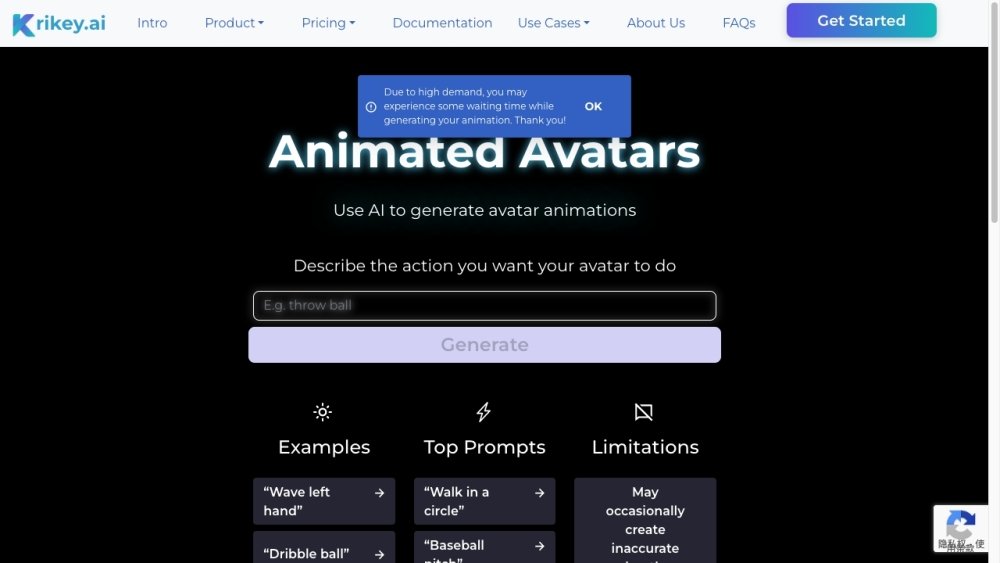
Krikey AI Free
$$0 /monthPricing from the source listing.
Krikey AI is an AI Animation Generator that allows users to create AI-powered animated videos in minutes. It offers free animation software with features like custom character creation, talking 3D avatars, AI animation generation, and a 3D video editor. Users can create various types of animated content, including cartoons, anime, memes, digital invitations, and more, with options for voiceovers and motion capture.
Users can create animations by customizing characters, adding voiceovers, and utilizing AI animation generation tools. The platform provides templates and a 3D video editor to facilitate the customization and creation of engaging animated videos.
Yes, the Krikey AI Animation maker uses a motion capture-style video-to-animation tool to enable anyone to create animated videos in minutes. It also includes a 3D video editor accessible directly in your web browser, requiring no coding, programming, or prior animation skills.
Krikey AI Animation maker allows you to create animations in minutes using text or video. You can enter a text prompt, such as “jumping jacks,” or upload a video of someone dancing or playing sports, and the tool will generate a 3D character animation based on your input.
Create your own free animation videos using generative AI templates. By entering a text prompt or uploading a video, Krikey AI can convert your input into 3D avatar animation videos. You can then use the browser-based video editor to produce engaging content in minutes.
With AI-powered tools, you can create a cartoon in minutes. Simply enter a text prompt like “jumping jacks” or upload a video of a dance move, and use AI motion capture to convert the text or video into 3D animations.
Krikey AI animation tools use generative AI to create 3D animations from text or video prompts. You can create animated videos in minutes and use the browser-based video editor to add voiceovers, camera shots, backgrounds, and more.
AI does not replace animators. While generative AI tools can accelerate creative workflows, they cannot fully replace an animator. AI can generate full-body animations, but storytelling, creativity, and character personality still require human input.
Creating your own animation takes only a few minutes. Open the Krikey AI video editor, select your custom avatar and 3D animation, and enter the dialogue you want your character to speak. You can choose from over 20 languages and click generate to produce a 3D animated video.
Within the Krikey AI video editor, you can select an anime avatar to create AI-powered 3D videos. Whether using an anime girl or boy character, you can add custom voiceovers, background images, and text.
To create free 3D animation videos in the Krikey AI video editor, start by selecting camera shots, custom avatars, AI-powered animations, and voiceovers. Creating AI animation videos with the Krikey AI 3D animation video editor is free.
Krikey AI Animation Maker is a leading tool for 3D animation and video editing. Its AI system combines motion capture technology with generative AI to convert 2D videos—such as a person dancing—into 3D character animations.
Krikey AI provides a browser-based tool that allows anyone to animate a 3D character for free in minutes. With a library of assets and animations, you can easily edit background images, camera shots, graphics, and custom avatars. No software download, coding, or animation experience is required.
Krikey AI offers a free, AI-powered 3D animation tool and video editor that supports custom avatars and voiceovers. It is easy to get started with templates, even without prior coding, programming, or 3D animation experience.
Krikey AI Animation Maker is free for individual use, with optional upgrades available for premium features. It is web-based animation software; simply create a free account online to begin.
You do not need animation, coding, or programming skills to use Krikey AI. You can generate AI animations by entering a text prompt or uploading a video. The platform also includes an animation library within the 3D video editor for your projects.
With the Krikey AI Animation maker, you can easily select or create an animation for your custom character and personalize your video in minutes. Add AI voice dialogue, aesthetic backgrounds, facial expressions, animated text, and more.
Krikey AI allows you to customize 3D characters, animate them, and add dialogue in seconds using voice AI. From graduation invitations to birthday cards, you can create talking avatars using the platform's invitation maker.
Yes, Krikey AI includes a library of 3D backgrounds and images. You can choose from existing options or upload your own to personalize your animation video.
Pricing from the source listing.
Pricing from the source listing.
Pricing from the source listing.
Pricing from the source listing.
Use these comparison pages to understand the trade-offs between the models most relevant to Krikey AI.
Compare Gemini 1.0 Pro Deprecated and Gemini 2.0 Flash across pricing, context window, capabilities, benchmarks, and API access to choose the better fit for long-context workloads versus long-context workloads.
Compare Gemini 1.0 Pro Deprecated and Gemini 2.5 Flash across pricing, context window, capabilities, benchmarks, and API access to choose the better fit for long-context workloads versus long-context workloads.
Compare Gemini 2.0 Flash Lite and Gemini 2.0 Flash across pricing, context window, capabilities, benchmarks, and API access to choose the better fit for long-context workloads versus long-context workloads.
Compare Gemini 2.5 Flash and Gemini 2.0 Flash across pricing, context window, capabilities, benchmarks, and API access to choose the better fit for long-context workloads versus long-context workloads.

Similar AI tool in the AI Image Generator category.
Similar AI tool in the AI Marketing category.
Similar AI tool in the AI Chatbot category.
Similar AI tool in the AI Image Generator category.
Similar AI tool in the AI Chatbot category.
Similar AI tool in the AI Image Generator category.
Similar AI tool in the AI Video Generator category.
Similar AI tool in the AI Writing Assistants category.
Similar AI tool in the AI Video Generator category.
Similar AI tool in the AI Chatbot category.
Similar AI tool in the AI Chatbot category.
Similar AI tool in the AI Image Generator category.