
Free
$0Free plan available.
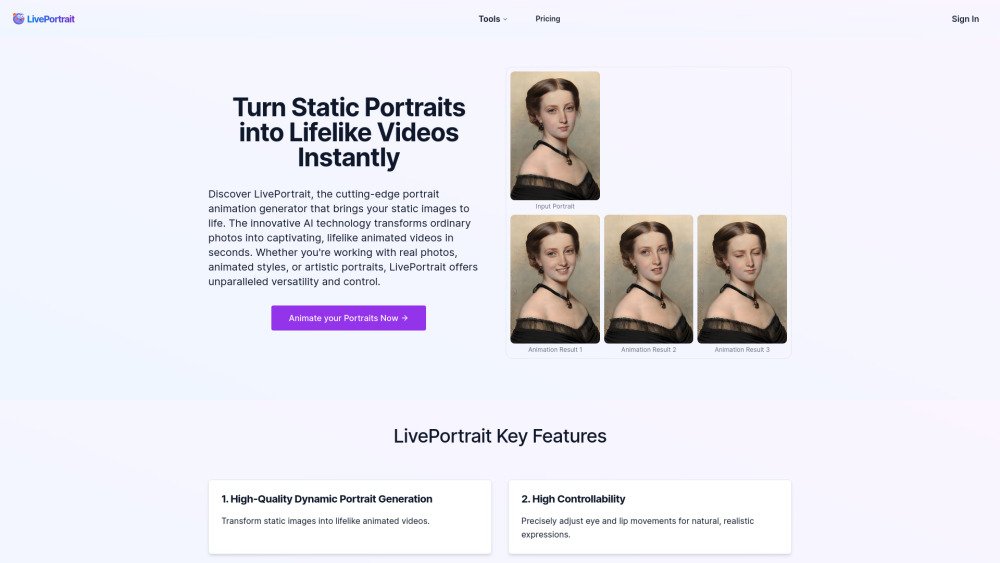
LivePortrait is an AI-powered tool that transforms static photos into lifelike animated videos. It uses advanced technologies to create high-quality animations with precise motion control and diverse style support. Users can customize animations using preset templates or their own videos.
To use LivePortrait, upload a portrait image, select a driving video from the library or upload your own, adjust the settings, generate the animation, and then download or share your final video.
LivePortrait is an efficient AI-powered tool for creating animated portraits. Open-sourced by Kuaishou Technology, it transforms static photos into lifelike moving videos.
LivePortrait performs best with clear facial images. It can animate real photos, cartoons, and artistic illustrations. For the best results, ensure the face is clearly visible. Supported formats include PNG, JPEG, and WEBP.
Yes. LivePortrait provides flexible customization options, allowing you to drive the animation using your own video or by selecting from a library of motion templates to create unique, personalized results.
When using your own video, please follow these guidelines: 1. Focus on the head, 2. Minimize shoulder movement, 3. Start with a neutral expression in the first frame, 4. Ensure the video is clear and well-lit.
LivePortrait is engineered to produce highly realistic animations that appear natural and lifelike.
LivePortrait utilizes advanced technologies, including a mixed image-video training strategy, upgraded network architecture, improved motion transformation, and specialized stitching and retargeting modules.
Generation time depends primarily on the length of the animation. Shorter animations can be produced in seconds, while more complex or longer videos may take a few minutes to process.
You can test LivePortrait for free at https://liveportrait.app/free-playground.
Support for animal animations is planned for the future, which will allow you to create lively animations of cats, dogs, and other animals.
Refunds are not offered for purchased credits. However, a free playground is available to test the tool before making a purchase.
For details on the original project, visit the project website at https://liveportrait.github.io/ or the GitHub repository at https://github.com/KwaiVGI/LivePortrait. For information regarding our specific service, please visit our official website or contact our support team.
Free plan available.
Use these comparison pages to understand the trade-offs between the models most relevant to LivePortrait.
Compare Gemini 1.0 Pro Deprecated and Gemini 2.0 Flash across pricing, context window, capabilities, benchmarks, and API access to choose the better fit for long-context workloads versus long-context workloads.
Compare Gemini 1.0 Pro Deprecated and Gemini 2.5 Flash across pricing, context window, capabilities, benchmarks, and API access to choose the better fit for long-context workloads versus long-context workloads.
Compare Gemini 2.0 Flash Lite and Gemini 2.0 Flash across pricing, context window, capabilities, benchmarks, and API access to choose the better fit for long-context workloads versus long-context workloads.
Compare Gemini 2.5 Flash and Gemini 2.0 Flash across pricing, context window, capabilities, benchmarks, and API access to choose the better fit for long-context workloads versus long-context workloads.

Similar AI tool in the AI Image Generator category.
Similar AI tool in the AI Video Generator category.
Similar AI tool in the AI API category.
Similar AI tool in the No-Code&Low-Code category.
Similar AI tool in the AI Video Generator category.
Similar AI tool in the AI Image Generator category.
Similar AI tool in the AI Assistant category.
Similar AI tool in the AI Video Generator category.
Similar AI tool in the AI Video Generator category.
Similar AI tool in the AI Marketing category.
Similar AI tool in the AI Image Generator category.
Similar AI tool in the AI Assistant category.