
Free
$0Free plan available.
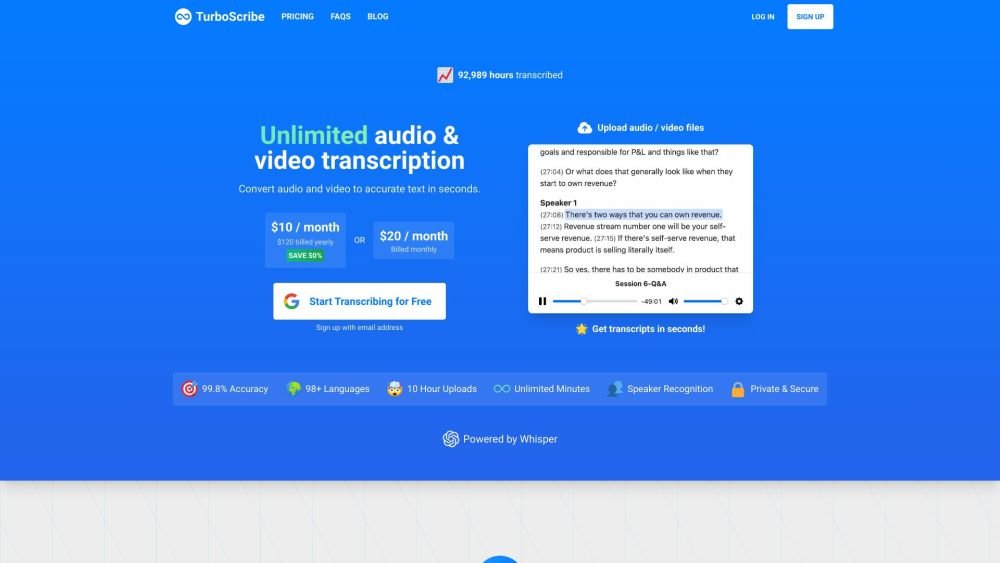
TurboScribe is an AI transcription service that converts audio and video files into accurate text in 98+ languages. It offers unlimited transcription with near-perfect accuracy, exporting in various formats like PDF, DOCX, SRT, and TXT. TurboScribe is powered by Whisper and provides features like speaker recognition and built-in translation.
Upload an audio or video file, select the language, choose a transcription mode (Cheetah, Dolphin, or Whale), and enable speaker recognition or audio restoration if needed. Then, click 'Transcribe' to generate the text.
TurboScribe is an AI transcription service that provides unlimited audio and video transcription. It converts files into text in over 98 languages with high accuracy.
TurboScribe Unlimited is priced at $10/month when billed annually or $20/month when billed monthly.
Yes, TurboScribe is unlimited. There are no caps on total usage, and users frequently transcribe hundreds of hours per month. The only restriction is that you cannot share your account login with others.
Yes, TurboScribe supports large uploads. Each file can be up to 10 hours long and 5GB in size. Unlimited members can upload up to 50 files simultaneously.
Yes. Your files, transcripts, and account data are encrypted and accessible only to you. You may delete them at any time. Payments are processed securely via Stripe, and your credit card information is not stored.
TurboScribe supports most common audio and video formats, including MP3, M4A, MP4, MOV, AAC, WAV, OGG, OPUS, MPEG, WMA, WMV, AVI, FLAC, AIFF, ALAC, 3GP, MKV, WEBM, VOB, RMVB, MTS, TS, QuickTime, and DivX.
Yes, transcripts can be downloaded in several formats, including PDF, DOCX, captions and subtitles (SRT/VTT), CSV, and TXT.
TurboScribe supports speech-to-text conversion in over 98 languages using advanced AI technology. English typically achieves the highest accuracy, often reaching human-level performance with strong recognition of domain-specific vocabulary.
While clear audio yields the best results, TurboScribe generally performs well with accents, background noise, and lower audio quality. For files with very poor audio, a built-in restoration tool is available.
You can enable speaker recognition by selecting the "Speaker Recognition" checkbox under "More Settings" during the upload process. This adds a small amount of processing time per hour of audio.
Yes, you can translate transcripts or subtitles into more than 130 languages by clicking the "Translate" button within the transcript view.
There are no overall usage caps, and the system is designed to support at least 720 hours of audio or video transcription per month.
You can cancel at any time via "Account Settings" and "Manage Subscription." You will retain access to TurboScribe until the end of your current billing cycle.
TurboScribe was created by Leif, who spent nearly a decade developing AI systems at companies like Meta.
Please visit the Help and Support Center for common inquiries. For further assistance, you can email leif@turboscribe.ai.
Free plan available.
Use these comparison pages to understand the trade-offs between the models most relevant to TurboScribe.
Compare Gemini 1.0 Pro Deprecated and Gemini 2.0 Flash across pricing, context window, capabilities, benchmarks, and API access to choose the better fit for long-context workloads versus long-context workloads.
Compare Gemini 2.0 Flash Lite and Gemini 2.0 Flash across pricing, context window, capabilities, benchmarks, and API access to choose the better fit for long-context workloads versus long-context workloads.
Compare Gemini 1.0 Pro Deprecated and Gemini 1.5 Flash Deprecated across pricing, context window, capabilities, benchmarks, and API access to choose the better fit for long-context workloads versus general-purpose AI workloads.
Compare Gemini 1.0 Pro Deprecated and Gemini 1.5 Flash Vision Deprecated across pricing, context window, capabilities, benchmarks, and API access to choose the better fit for long-context workloads versus general-purpose AI workloads.

Similar AI tool in the AI Transcription category.
Similar AI tool in the AI Copilot category.
Similar AI tool in the AI Summarizer category.
Similar AI tool in the AI Writing Assistants category.
Similar AI tool in the AI Chatbot category.
Similar AI tool in the AI Assistant category.
Similar AI tool in the AI Assistant category.
Similar AI tool in the AI Chatbot category.
Similar AI tool in the Large Language Models (LLMs) category.
Similar AI tool in the AI Assistant category.
Similar AI tool in the AI Writing Assistants category.
Similar AI tool in the AI Assistant category.